
Advanced Writer
A modular narrative engineering system that uses neurochemical pacing, Jungian depth psychology, structural paradigm selection, and automated pathology diagnostics to produce fiction that resists the default failure modes of AI-generated prose.
Technical Stack & Architecture
| Layer | Component | Description |
|---|---|---|
| System Prompts | skill/SKILL.md | Anthropic Skill 2.0 router pattern — 8 craft references, 5 workflows, 3 output templates |
| MCP Server | src/server.ts | TypeScript MCP server exposing narrative engineering workflows as tools |
| Web UI | app/studio/page.tsx | Next.js "Studio" IDE chat interface for real-time writing, side-by-side editing, and tool tracking |
| Vector DB | src/storage/chroma.ts | ChromaDB for persistent story arcs, world lore, and semantic context retrieval |
| Graph DB | src/storage/neo4j.ts | Neo4j Graph DB for character archetypes, faction systems, and relationship networks |
| AI Routing | src/ai/router.ts | Per-task routing layer supporting OpenRouter (cloud models) and Ollama (local models) |
| Configuration | .env | Configuration file for API keys, database settings, and narrative parameters |
The Writing Studio IDE
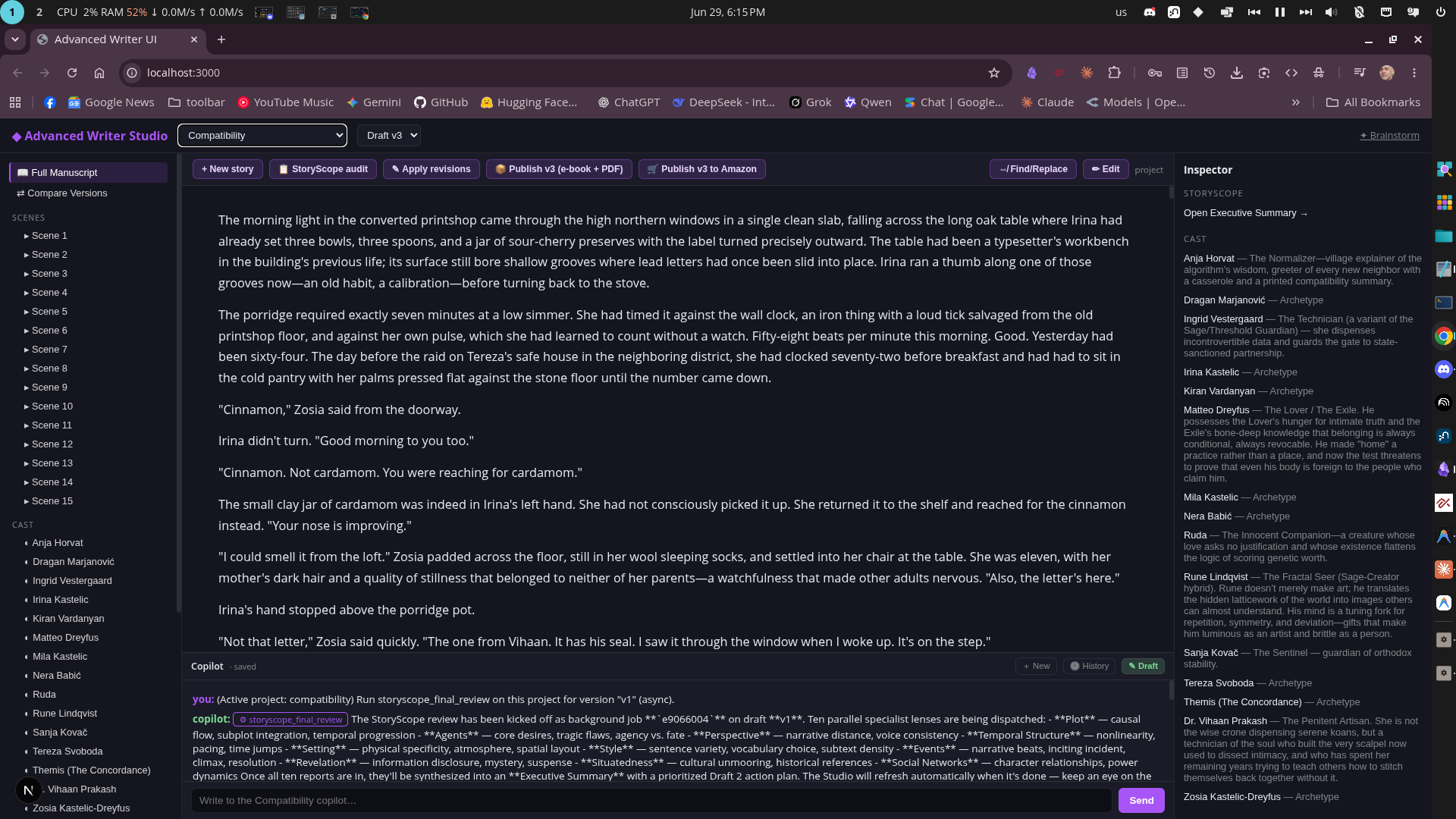
The primary interface of the system is the Writing Studio IDE (available at http://localhost:3000), which replaces the classic chatbot with a three-pane workspace tailored for professional fiction development:
- Narrative Explorer (Left Panel): A tree-view directory that displays active stories, available draft versions (e.g.
v1,v2,v3), individual scenes, character sheets, structure briefs, and generated export assets. - Manuscript Editor (Center Panel): A dominant editor showing the compiled story manuscript or the selected scene/document. Includes a visual Diff comparison tab that displays character-by-character insertions and deletions for draft revisions.
- Contextual Inspector (Right Panel): Dynamic inspector showing details related to the active selection:
- Story Settings: Core story identity, logline, and target draft version.
- Scene Diagnostics: Neurochemical transportation curves and pathology scorecards.
- Character Cards: Pankseppian and Plutchikian profiling for selected characters.
- Copilot Rail (Bottom Panel): A persistent chat system that is always aware of the active project and automatically injects context using read_story to prevent the AI from repeatedly asking the author to restate what their story is about.
Asynchronous Background Jobs
Long-running generation tasks—such as creating a full novel blueprint, running a comprehensive manuscript review, or batch revising pathologies—execute as detached background tasks.
- When launched, these tools immediately return a unique job ID.
- The UI store (app/store/workspaceStore.ts) automatically polls background job statuses.
- Upon job completion, the Zustand store updates the local workspace state, auto-refreshing the Narrative Explorer tree and Manuscript Editor view.
Setup & Prerequisites
1. General Setup
- Install Node.js & NPM: Ensure you have Node.js (v18+) installed.
- Build the Project:
npm install npm run build - Configure Environment Variables:
Copy .env.example to
.envand fill in your API keys (e.g.OPENROUTER_API_KEY) and database credentials:cp .env.example .env
2. ChromaDB Vector Setup
Chroma DB is used for semantic retrieval of story arcs, lore, and character memories.
Zero-Manual-Steps Auto-Starter
The system features a node-native auto-starting server layer (src/storage/chroma-server.ts).
- You do not need to install Python Chroma packages or manually run
chroma runin a separate terminal. - When the MCP server or Web UI first initializes, it checks if a Chroma server is running on the configured host and port.
- If not, it automatically spawns the Chroma CLI directly from the bundled npm package (
node_modules/chromadb/dist/cli.mjs run). - Data is saved persistently in the folder configured by
CHROMA_PERSIST_DIR(defaults to./data/chroma).
Embedding Model Setup (Ollama)
ChromaDB utilizes Ollama to compute embeddings locally via the official @chroma-core/ollama wrapper.
- Install Ollama: Follow instructions at ollama.com to run the Ollama daemon.
- Pull the Default Embedding Model:
Run the following command to download the default embedding model,
nomic-embed-text:ollama pull nomic-embed-text - (Optional) Customize Config in
.env: Adjust the defaults if needed:OLLAMA_BASE_URL=http://localhost:11434 OLLAMA_EMBEDDING_MODEL=nomic-embed-text:latest CHROMA_HOST=localhost CHROMA_PORT=8001 CHROMA_PERSIST_DIR=./data/chroma
3. Neo4j Graph Setup
Neo4j is utilized to map complex character networks, archetypal structures, and lore facts.
- Install Neo4j: Download and install Neo4j Desktop (free Community Edition) or run via Docker.
- Install Graph Data Science Library: Open your database settings in Neo4j Desktop and ensure the GDS (Graph Data Science) plugin is installed and activated.
- Database Configuration:
Create a database and update your .env file with the credentials:
NEO4J_URI=bolt://localhost:7687 NEO4J_USER=neo4j NEO4J_PASSWORD=your_password_here NEO4J_DATABASE=neo4j - Verify Neo4j Connection:
You can run the test script to verify your Neo4j configuration is working:
npx tsx test_workspace.ts
4. Running the System
- Run the MCP Server:
To start the MCP server directly via stdio:
npm run start - Add to MCP Client: Reference mcp_config.json.example to register the server in your MCP client (e.g. Claude Desktop, Cursor). Make sure the path points to your built dist/index.js.
- Run the Web Studio UI:
Opennpm run dev:uihttp://localhost:3000in your web browser.
MCP Tools Reference
The Model Context Protocol server exposes 17 specialized tools to handle the narrative engineering lifecycle:
Idea & Brainstorming
- brainstorm_ideas Generate a batch of genuinely good, distinct story concepts (logline + genre + tone + hook) for brainstorming — premises with a real emotional core and a fresh angle, the kind that could become a beloved or cult-classic novel, never gimmicks or absurdist mashups. Use when the user wants fresh story ideas, riffs on a seed, or 'more like that' — discussion only; this never starts writing a story.
Narrative Architecture
- create_narrative (Async-capable) Build a complete narrative from a logline, premise, or raw idea. Runs an 8-step pipeline: intake -> hamartia -> framework -> characters -> architecture -> draft -> diagnostic.
- select_structure Interactively select the right structural framework (Truby, Dramatica, Kishōtenketsu, Fichtean) for a story based on its Designing Principle.
- build_world_bible Expands a premise into a highly detailed World Bible including Factions, Tech/Magic, Economics, and Geography, and saves it to Vector Memory.
Character & Cast Setup
- develop_character Create, update, query, list, or shadow-match characters in the persistent Archetypal Database.
Drafting & Expansion
- expand_to_novel (Async-capable) Expands a synopsis into a structured ARC (beat-sheet scaffold seeded into the graph timeline + Chroma), runs a world-model self-consistency check, and optionally auto-drafts the whole manuscript beat by beat with the per-scene continuity gate.
- continue_narrative (Async-capable) Continue drafting a story by generating the next scene based on the previous scene, the story architecture, and user direction.
Diagnosis & Editing
- review_narrative Run neurochemical scoring, pathology diagnostics, and agency enforcement on existing text. Produces a structured neuro-critique report.
- rewrite_scene Targeted scene rewriting with before/after neurochemical scoring. Identifies specific pathologies and produces an improved version.
- batch_revise_pathologies (Async-capable) Scans a story's diagnostics, triggers a Character Writer's Room debate for failing scenes, and automatically rewrites them based on the characters' feedback.
- find_replace Deterministic find & replace across a story's documents — the literal counterpart to the AI rewrite tools. Renames a term everywhere, fixes a recurring typo, or changes a single word/line, touching ONLY the matched text. Defaults to a safe PREVIEW (apply=false) that reports every match without changing files; set apply=true to write the edits (each touched file is backed up first). Supports literal, whole-word, and regex matching.
Post-Draft Analysis & Second Draft Pass
- storyscope_final_review (Async-capable) Runs the ultimate multi-agent StoryScope review on a finished manuscript. Dispatches 7 parallel analytical lenses (Plot, Agents, Style, etc.) and synthesizes them into an Executive Summary.
- apply_storyscope_revisions (Async-capable) Builds the next draft version from the StoryScope review. Non-destructive and auto-incrementing (v1->v2->v3...). The planner assigns each critique issue to EXACTLY ONE operation: 'rewrite' (full-scene revision), 'line_edit' (surgical anchored edits that preserve polished prose), 'cut_scene', 'merge_scenes', or 'add_scene' — so structural fixes the review asks for are actually executable. Every change is (a) checked against the World Bible's hard rules, (b) VERIFIED against its own directive (PASS/FAIL with cited evidence, retried with auditor feedback on FAIL), (c) re-scored on the neurochemical diagnostic, and (d) logged with deterministic diff stats. Ends with a COVERAGE REPORT mapping every critique item -> op -> scene -> verified status (including items it could NOT action, honestly), and updates the persistent cross-version issue ledger. Pass 'directives' to apply a human-approved/edited plan instead of the auto-generated one. This tool only revises PROSE — for canon reconciliation use reconcile_storyscope_canon.
- reconcile_storyscope_canon (Async-capable) Applies the StoryScope review's CANON RECONCILIATION findings: updates the World Bible, Architecture Brief, and character graph metadata so the planning documents catch up to the manuscript's improvements. Complements apply_storyscope_revisions, which only rewrites prose and deliberately ignores canon divergence — this tool is the other half of the review's to-do list and never touches scene text. Non-destructive: the previous World Bible / Architecture Brief are backed up before being overwritten, and every run appends to a persistent changelog.
Publishing & Export
- publish_story Package a finished story for publishing. target='amazon' (default) produces the full Amazon/KDP kit: e-book, cover image, print-ready paperback PDF, a listing sheet (description, keywords, categories), and a plain-language upload walkthrough. target='share' produces just a clean e-book + reading PDF. Non-destructive: writes to the project's publish/ folder. Use when the user wants to publish, sell, export, or ship their finished book.
Background Job Management
- check_job Check the status/result of a background job started by running a long tool with async=true. Returns running | completed | failed plus the final summary.
- list_jobs List recent background jobs (most recent first) with their status.
Interaction & Copilot Modes
During narrative drafting and brainstorming, you can switch between three interaction modes:
- Brainstorm Q&A (Default): The Copilot conducts interactive interviews, asking clarifying questions and planning structural directions before writing.
- Collaborative: The Copilot drafts scene-by-scene, stopping to request author feedback, reviews, and edits before moving forward.
- Fast-Auto: The Copilot writes autonomously, generating the manuscript from the available story architecture and beats without blocking for input.
File Structure
advanced-writer/
├── README.md                         # Project documentation
├── LICENSE                           # GPLv3 License file
├── package.json                      # Node project configuration
├── package-lock.json                 # Lockfile for dependencies
├── tsconfig.json                     # TypeScript configuration (Next.js app/src)
├── tsconfig.mcp.json                 # TypeScript configuration (MCP server build)
├── next.config.js                    # Next.js configuration (Webpack resolution)
├── test_workspace.ts                 # Test script for Neo4j connection
├── mcp_config.json.example           # Example configuration for MCP client
├── app/                              # Next.js Web UI
│   ├── page.tsx                      # Primary page router (defaults to Studio)
│   ├── layout.tsx                    # Root HTML layout
│   ├── globals.css                   # Global styles & layout variables
│   ├── classic/                      # Classic dashboard UI (deprecated)
│   │   └── page.tsx
│   ├── studio/                       # Writing Studio IDE
│   │   └── page.tsx                  # Three-pane Studio interface
│   ├── store/                        # Frontend state
│   │   └── workspaceStore.ts         # Zustand store for project polling & jobs
│   └── api/                          # Serverless routes for Web UI
│       ├── chat/route.ts             # Copilot endpoint (wraps MCP tools + read_story)
│       └── workspace/route.ts        # Workspace directory polling
├── skill/                            # Narrative engineering core directives & guidelines
│   ├── SKILL.md                      # Intake router & craft philosophy
│   ├── workflows/                    # Step-by-step procedures (intake, rewrite, etc.)
│   ├── references/                   # Core modules (Neurochemical, Jungian, Agency, etc.)
│   └── templates/                    # Output blueprints (character sheets, briefs)
├── src/                              # MCP Server Source Code
│   ├── index.ts                      # Server startup entry
│   ├── server.ts                     # MCP server setup & schema registration
│   ├── config.ts                     # Environment variable parsing and validation
│   ├── jobs.ts                       # Asynchronous background job system
│   ├── tools/                        # MCP Tool definitions & execution dispatchers
│   │   ├── index.ts                  # Tool registry & job execution routing
│   │   ├── brainstorm.ts             # Concept brainstorming engine
│   │   ├── publish-story.ts          # Packaging exporter tool
│   │   └── ...                       # Other MCP tool handlers
│   ├── publish/                      # Publishing formats & exporters
│   │   ├── amazon.ts                 # KDP listing metadata & guide compiler
│   │   ├── chapters.ts               # Chapter reader utility
│   │   ├── epub.ts                   # Zip packaging for EPUB 3
│   │   └── pdf.ts                    # Headless Puppeteer print PDF rendering
│   ├── storage/                      # Database persistence layer
│   │   ├── chroma-server.ts          # Zero-install node auto-starter for Chroma
│   │   ├── chroma.ts                 # Chroma client & Ollama embeddings setup
│   │   ├── neo4j.ts                  # Neo4j driver & Cypher transaction utilities
│   │   └── workspace.ts              # File-based manuscript folder manager
│   ├── ai/                           # AI provider layer
│   │   └── router.ts                 # Model capabilities router
│   └── types/                        # Shared type definitions
└── data/                             # Runtime data (gitignored)
    ├── chroma/                       # Local Chroma DB data
    └── workspace/                    # Stories directory (exports, manuscripts, drafts)
No comments yet
Be the first to share your take.