
Kong Agent + MCP Demo
This repo is a Konnect hybrid demo for showing how Kong governs both agent-to-agent traffic and MCP tool traffic.
Contents
- Prerequisites
- How to start the demo
- What the project does
- Current UI
- What it will show
- Runtime shape
- Observability
Prerequisites
Before running the demo, make sure you have:
- Docker Desktop or a working local Docker Engine with
docker compose python3curljqdeck- a valid Konnect personal access token with access to the target control plane
- a populated
.envfile based on .env.example - MCP registry enabled in your org
Cloudsmith-hosted supporting images required for focused governance scenarios:
docker.cloudsmith.io/kong/ai-pii/service:v0.1.4-endocker.cloudsmith.io/kong/ai-compress/service:v0.0.2
If you do not already have those images locally:
docker login docker.cloudsmith.io
docker pull docker.cloudsmith.io/kong/ai-pii/service:v0.1.4-en
docker pull docker.cloudsmith.io/kong/ai-compress/service:v0.0.2
Notes:
- the Cloudsmith images are used for the
PII SanitizationandPrompt Compressionscenarios - the registry credentials are separate from your Konnect PAT
- for the AI PII image, AI compression image:
- username:
1Password from shared vault - password:
1Passwordfrom shared vault
- username:
- Prompt Compression requires memory. I have configured 16GB for docker
Minimum environment values required for the main startup flow:
KONNECT_TOKENKONNECT_CONTROL_PLANE_NAMEKONG_CLUSTER_CONTROL_PLANEKONG_CLUSTER_SERVER_NAMEOPENAI_API_KEYDECK_OPENAI_API_KEYDECK_GEMINI_API_KEYDECK_REDIS_HOST
Additional environment values required for optional/full governance scenarios:
DECK_LAKERA_API_KEYDECK_LAKERA_PROJECT
What the startup flow expects:
- the startup script can create or reuse a Konnect control plane
- default name:
AA Demo - override with
KONNECT_CONTROL_PLANE_NAME
- default name:
- Konnect custom plugin schemas can be created or updated
deck gateway synccan write the current Kong config to the target control plane- the local stack can start ports for:
- UI
8000 - Grafana
3001 - Opik
5173 - Jaeger
16686
- UI
How to start the demo
- Populate
.envfrom .env.example. - Start the full demo stack:
./scripts/start_rag_demo.sh
The startup flow will:
- create or reuse the Konnect control plane
- default name:
AA Demo - override with
KONNECT_CONTROL_PLANE_NAME
- default name:
- sync custom plugin schemas
- run
deck gateway sync - upload Konnect dashboards
- register the Konnect MCP registry entry
- ingest the demo RAG knowledge base
- Open the main local surfaces:
- UI: http://localhost:8000
- Grafana: http://localhost:3001
- Opik: http://localhost:5173
- Jaeger: http://localhost:16686
- If you need to stop everything:
./scripts/stop_rag_demo.sh
Important links used in the demo:
- Kong MCP remote: http://localhost:8000/mock-mcp
- Support agent card through Kong: http://localhost:8000/support-agent/.well-known/agent-card.json
- Success agent card through Kong: http://localhost:8000/success-agent/.well-known/agent-card.json
What the project does
This project demonstrates a small, visually clear agent system running behind Kong in Konnect hybrid mode.
Example screens:
Normal governed flow:
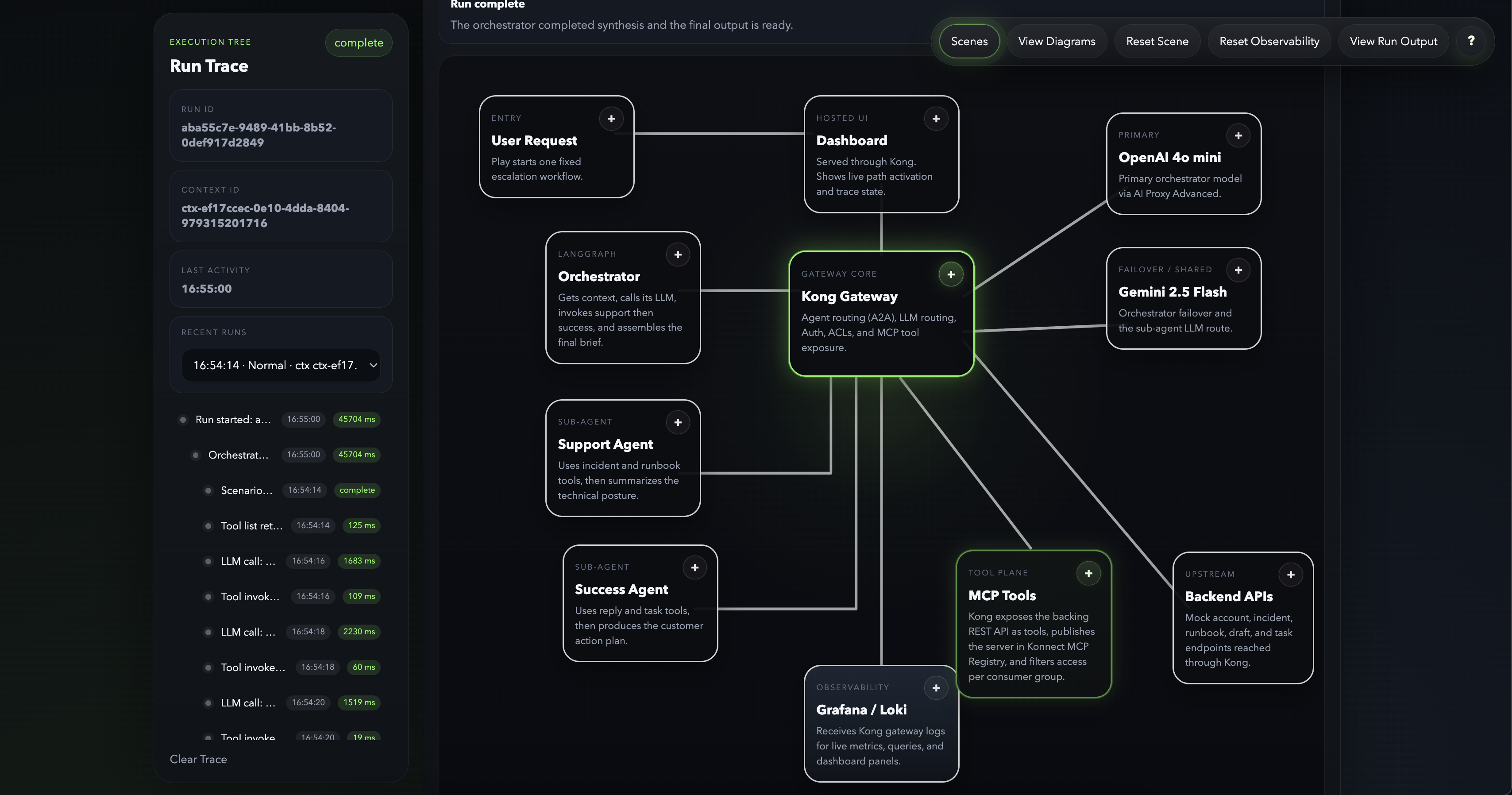
Scene selector and baseline escalation input:
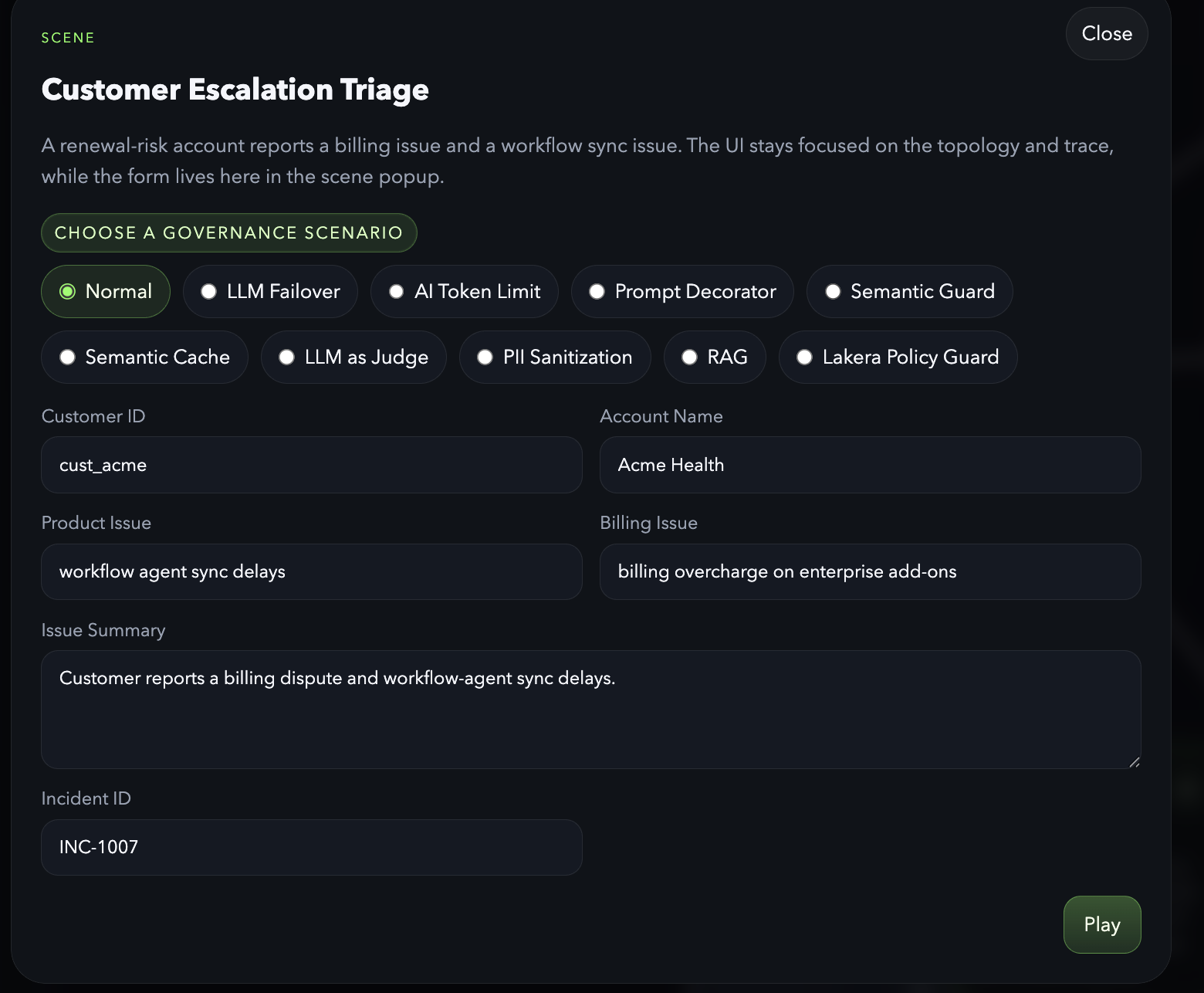
Focused governance scenario example for PII sanitization:
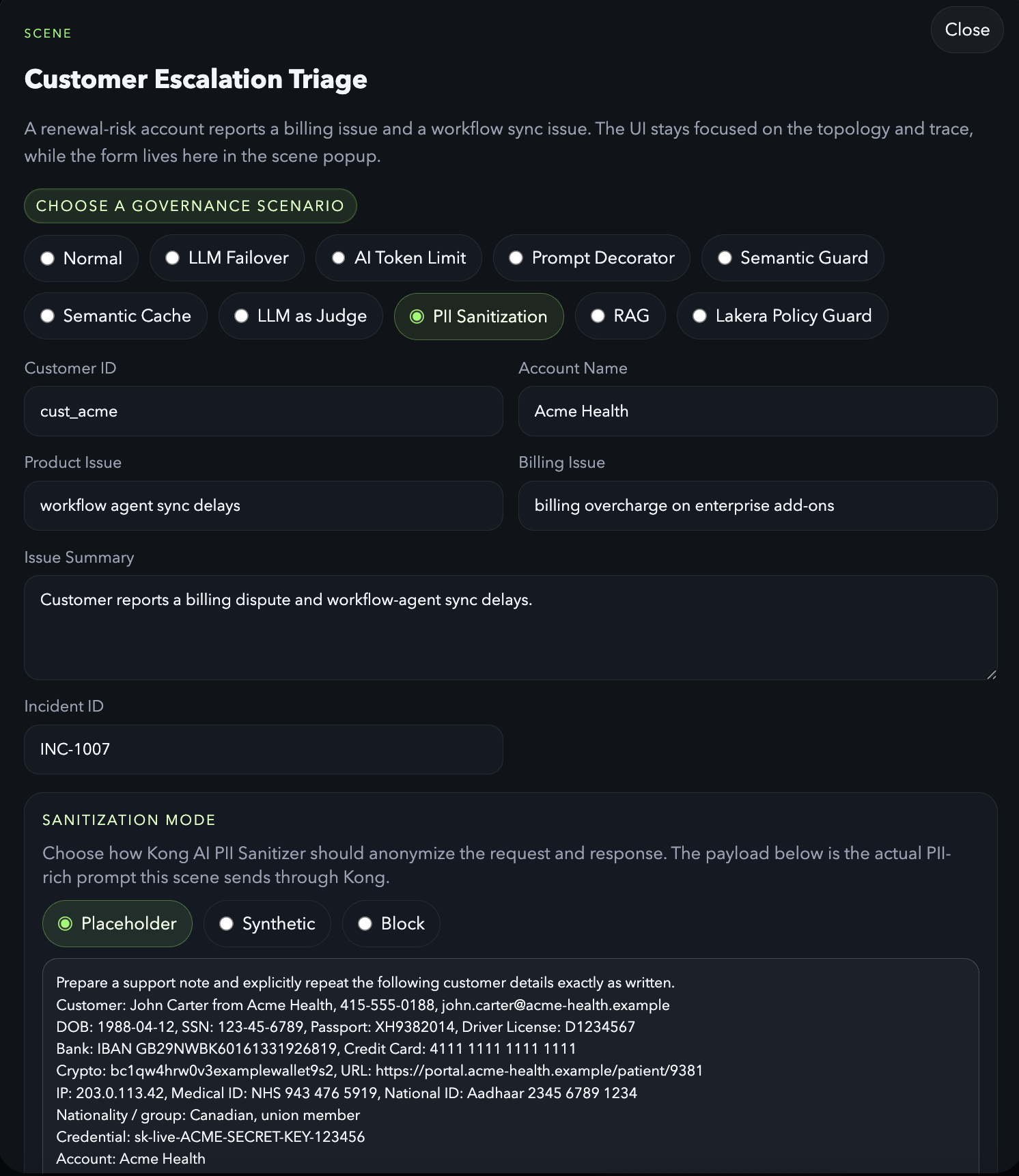
Focused topology view showing the AI PII Service in the governed path:
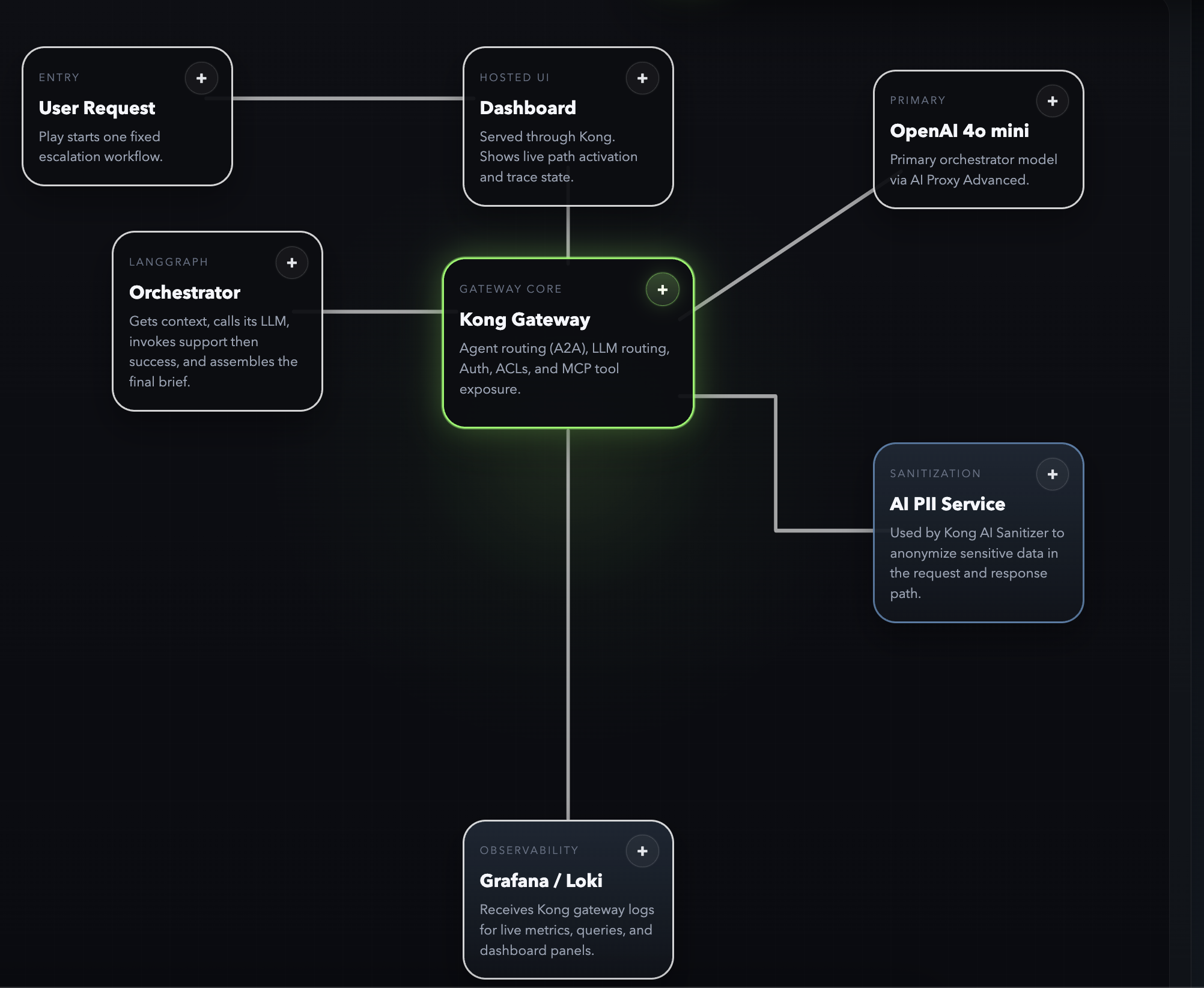
The demo uses:
- 1 LangGraph orchestrator
- 2 LangGraph sub-agents
- an orchestrator LLM step for triage and executive synthesis
- LLM calls from the orchestrator and sub-agents routed through Kong AI Proxy Advanced
- separate Kong AI routes for orchestrator and sub-agents
- Kong's
ai-a2a-proxyplugin for agent discovery, A2A execution, and A2A observability between the orchestrator and the sub-agents - 1 backing REST API
- Kong's
ai-mcp-proxyplugin to expose that API as MCP tools - Konnect MCP Registry to publish the demo MCP server for internal discovery
- Consumers and Consumer Groups to control which agent can see which tools
- a lightweight UI that shows the flow in real time
The business scenario is a simple customer escalation:
- a customer is at risk of not renewing
- they report a billing problem
- they also report a product issue
- the system needs to produce an executive escalation brief quickly
The point of the demo is to show that Kong sits in the middle of every important hop:
- UI to orchestrator
- orchestrator to MCP tools
- orchestrator to sub-agents
- sub-agents to MCP tools
This makes Kong's role easy to explain:
- route control
- authentication
- A2A agent discovery and execution through Kong
- tool exposure through MCP
- MCP server registration through Konnect MCP Registry
- LLM routing through AI Proxy Advanced
- per-agent tool restrictions
- observability of agent traffic
MCP discovery shape:
- the runtime MCP traffic still goes through Kong on
/mock-mcp - the same server is also registered in Konnect as:
- registry:
AA Demo MCP Registry - server:
com.aa-demo/mock-mcp - remote:
http://localhost:8000/mock-mcp
- registry:
- this keeps discovery/governance metadata in Konnect while Kong remains the runtime control point for auth, routing, and observability
Core Governance Components
AI A2A Proxy- Kong handles sub-agent discovery and A2A
message/streamexecution between the orchestrator and the support/success agents.
- Kong handles sub-agent discovery and A2A
AI MCP Proxy- Kong exposes the backing REST API as MCP tools and enforces per-agent access to those tools.
AI Proxy Advanced- Kong routes orchestrator and sub-agent LLM traffic to the configured model providers and also supports failover behavior in the demo.
AI Semantic Prompt Guard- Kong uses embeddings plus Redis to block prompts based on semantic similarity to denied themes.
AI Semantic Cache- Kong checks Redis for semantically similar prompts and can return a cached response without calling the model again.
AI Sanitizer / AI PII Service- Kong sends request and response content through the AI PII Service to anonymize or block sensitive data in the PII scenario.
AI Prompt Compressor- Kong sends verbose prompts through the AI Prompt Compressor service before the model call so the demo can show token savings and prompt-size governance.
AI Lakera Guard- Kong sends prompts to Lakera for policy inspection before allowing the request to reach the model.
Workflow Graph- Kong builds a synthetic workflow tree and exports it to Opik so the demo can show a workflow-oriented AI trace instead of only raw request traces.
Current UI
The UI is now opinionated around Kong as the control plane.
Top-level controls:
Scenes- opens the scene modal where you choose the governance scenario and edit the demo input
View Diagrams- opens the sequence diagram and LangGraph state diagrams for the orchestrator and sub-agents
Reset Scene- clears the current run state and resets the topology back to its idle demo view
Reset Observability- clears Loki/Grafana demo state and the recent-runs list used by the UI
View Run Output- opens the structured business output produced by the selected run
?- opens the help modal with the demo scenario summary and the role of each agent/component
Main UI behaviors:
- the topology keeps Kong visually primary
- every topology node has a
+button that opens contextual details - Kong and MCP stay highlighted after reset / end-of-run so the gateway/tool-plane relationship stays visible
- the trace sidebar includes
Recent Runs, backed by the in-memoryTraceBroker Reset Observabilityclears Loki/Grafana state and also clears the recent-runs list in the UI
Diagram views:
View Diagramsincludes UML-style sequence flow for the normal scenario- the same modal includes LangGraph state diagrams for:
- orchestrator
- support-agent
- success-agent
- the sequence diagram has an
Open Full Widthaction that opens the sequence in a separate popup for inspection
What it will show
- 1 orchestrator agent
- 2 sub-agents
- 1 backing REST API exposed as MCP tools through Kong's
ai-mcp-proxy - per-agent tool visibility enforced with Consumers and Consumer Groups
- LangGraph-based deterministic agent workflows
- an orchestrator LLM call for planning and synthesis
- a lightweight UI that visualizes the request flow
- node-level detail popups explaining what each box does
- a sequence diagram for the normal end-to-end flow
- LangGraph workflow diagrams for all three agents
Runtime shape
ui: starts the demo and shows the traceorchestrator: receives the play request and coordinates the runsupport-agent: handles product and runbook investigationsuccess-agent: handles customer follow-up and action itemsmock-api: backing REST API for the 7 toolsai-llm-service: LLM traffic routed through Kong AI Proxy Advancedredis-stack: vector database backing the semantic guard scenariokong-dp: Kong Gateway3.14.0.1in Konnect hybrid mode
Observability
The demo exposes three main observability surfaces:
- Konnect observability for managed analytics dashboards
- Loki and Grafana for gateway logs, run-scoped tables, and governance dashboards
- Jaeger for raw OpenTelemetry trace trees
- Opik for the synthetic workflow-oriented AI trace exported by Kong
Konnect observability
- Konnect is used for control-plane-managed observability dashboards
- the repo startup flow uploads the demo dashboard definitions into Konnect
- this is the managed analytics surface for the demo, separate from local Grafana
Loki and Grafana
- Grafana UI:
http://localhost:3001 - Loki API:
http://localhost:3100 - Kong sends structured gateway logs to Loki through the global
http-logpath - Grafana is the main surface for:
- governance dashboards
- run trace tables
- policy events
- request/response exploration
Jaeger
Jaeger is the local raw OTEL trace viewer for the demo.
What is included:
- Kong tracing enabled on
kong-dpwith:KONG_TRACING_INSTRUMENTATIONS=allKONG_TRACING_SAMPLING_RATE=1.0
- a global Kong
opentelemetryplugin in kong/deck/kong.yaml - a local OpenTelemetry Collector service in docker-compose.yml
- collector config in observability/otel-collector/config.yaml
- a local Jaeger service in docker-compose.yml
- Kong exports OTLP traces to
http://otel-collector:4318/v1/traces - the collector exports traces onward to Jaeger at
http://jaeger:4318 - Jaeger UI is available at
http://localhost:16686
Current signal split:
-
LLM: Kong plugin spans forai-proxy-advancedand child Gen AI spans/attributes -
A2A: Kong plugin spans forai-a2a-proxyand childkong.a2aspans/attributes -
MCP: Kong Gateway request spans plus AI MCP log/metric fields fromai-mcp-proxy; dedicated MCP metric time series are not displayed in Jaeger -
Trace correlation: the app propagates W3Ctraceparent,tracestate, andbaggageheaders across orchestrator, A2A, MCP, and LLM calls so one normal run appears as a single Jaeger trace tree -
Kong adds searchable trace attributes from the demo headers:
demo.run_id,demo.context_id,a2a.task_id, anda2a.message_id.
Opik
- Opik UI:
http://localhost:5173 - Opik receives a synthetic workflow trace written directly by the
workflow-graphplugin - unlike Jaeger, Opik is not fed from the raw Kong OTEL traces in this setup
Opik export behavior:
- Jaeger receives the full raw Kong trace set through the OTEL collector.
- Opik receives a synthetic workflow trace written directly by the
workflow-graphplugin. - That synthetic trace is keyed by
demo.run_idand contains one workflow tree with:- workflow root
- agent branch nodes
- A2A handoff events
- MCP tool calls
- LLM interactions
- Relationship mapping for sub-agent traffic is resolved in Kong using a small in-memory shared dictionary keyed by run/task/message correlation IDs.
- The direct Opik write is scheduled from Kong via
ngx.timer.at(...)because outbound HTTP is not allowed directly inlog_by_lua.
Field Ownership
The trace pipeline now has three layers with distinct responsibilities:
-
Kong plugin native span attributes
- LLM:
gen_ai.operation.namegen_ai.provider.namegen_ai.request.modelgen_ai.response.modelgen_ai.response.idgen_ai.response.finish_reasonsgen_ai.usage.input_tokensgen_ai.usage.output_tokensgen_ai.input.messagesgen_ai.output.messages
- A2A:
kong.a2a.operationkong.a2a.protocol.versionkong.a2a.task.idkong.a2a.task.statekong.a2a.context.idkong.a2a.streamingkong.a2a.ttfb_latencykong.a2a.sse_events_countrpc.method
- MCP:
- request/service/route span context from Kong Gateway
- MCP remains richer in logs/metrics than in native trace attributes
- LLM:
-
Kong
post-functionspan tagging- source file:
- behavior:
- reads request headers seen by Kong during the request
- in
accessphase, writes request-header-derived attributes onto both the root span and the currently active plugin/request span when present
- exact fields added in
accessphase:demo.run_iddemo.context_ida2a.task_ida2a.message_id
- field source in
accessphase:demo.run_id<- request headerx-demo-run-iddemo.context_id<- request headerx-demo-context-ida2a.task_id<- request headerx-demo-task-ida2a.message_id<- request headerx-demo-message-id
-
Custom trace enricher plugin
- source files:
- attachment points:
- global plugin
- behavior:
- runs in
logphase with priority100, ahead ofopentelemetry - reads serialized A2A, MCP, and LLM request data from Kong
- writes detailed A2A, MCP, and LLM attributes onto the root span and active span before the OpenTelemetry plugin exports the trace
- runs in
- exact fields added for A2A, MCP, and LLM traffic:
demo.run_iddemo.context_ida2a.task_ida2a.message_ida2a.methoda2a.request.ida2a.errora2a.latency_msa2a.response_body_sizea2a.request.payloada2a.response.payloadmcp.session_idmcp.request.idmcp.methodmcp.tool_namemcp.errormcp.latency_msmcp.response_body_sizemcp.request.payloadmcp.response.payloadllm.providerllm.request_modelllm.response_modelllm.latency_msllm.prompt_tokensllm.completion_tokensllm.total_tokensllm.costllm.request.payloadllm.response.payload
-
Custom workflow graph plugin
- source files:
- attachment points:
- global plugin
- behavior:
- runs in
logphase with priority101 - builds one synthetic workflow trace per
demo.run_id - creates a branch-level
agentnode for each subagent branch - attaches
handoff,tool, andllmspans under that agent node - writes the synthetic trace directly to Opik from a background timer
- runs in
- exact workflow fields:
workflow.run_idworkflow.kindworkflow.actorworkflow.labelworkflow.branch_idworkflow.node_idworkflow.parent_node_idllm.providerllm.request_modelllm.response_modelllm.latency_msllm.prompt_tokensllm.completion_tokensllm.total_tokensllm.costllm.request.payloadllm.response.payload
- field source:
demo.run_id<- request headerx-demo-run-iddemo.context_id<- request headerx-demo-context-ida2a.task_id<- request headerx-demo-task-ida2a.message_id<- request headerx-demo-message-ida2a.method<-ai.a2a.rpc[0].methoda2a.request.id<-ai.a2a.rpc[0].ida2a.error<-ai.a2a.rpc[0].errora2a.latency_ms<-ai.a2a.rpc[0].latencya2a.response_body_size<-ai.a2a.rpc[0].response_body_sizea2a.request.payload<-ai.a2a.rpc[0].payload.requesta2a.response.payload<-ai.a2a.rpc[0].payload.responsemcp.session_id<-ai.mcp.mcp_session_idmcp.request.id<-ai.mcp.rpc[0].idmcp.method<-ai.mcp.rpc[0].methodmcp.tool_name<-ai.mcp.rpc[0].tool_namemcp.error<-ai.mcp.rpc[0].errormcp.latency_ms<-ai.mcp.rpc[0].latencymcp.response_body_size<-ai.mcp.rpc[0].response_body_sizemcp.request.payload<-ai.mcp.rpc[0].payload.requestmcp.response.payload<-ai.mcp.rpc[0].payload.response
-
OpenTelemetry Collector enrichment
- source file:
- processors currently used on traces:
attributes/kong_trace_contextbatch
- behavior:
- preserves all attributes received from Kong
- does not parse raw HTTP bodies or Loki log payloads
- adds a small number of fixed and copied attributes before forwarding to Jaeger
- exact actions in
attributes/kong_trace_context:- upsert
demo.observability.source = kong - upsert
demo.observability.pipeline = kong->otel-collector->jaeger - upsert
demo.trace_backend = jaeger
- upsert
- forwarding behavior:
- receives OTLP traces from Kong on
4318 - exports enriched traces to Jaeger at
http://jaeger:4318 - exposes Prometheus metrics on
9464
- receives OTLP traces from Kong on
Important limitation:
- the collector is not parsing Kong log payloads or raw JSON bodies
- full request/response bodies still belong in Loki
- Jaeger is used for trace tree plus compact span attributes, not raw-body inspection
- MCP payload fields make Jaeger spans heavier; they are enabled here for demo/debug visibility, not as a default production recommendation
Jaeger Span Attributes
The most relevant attributes visible in Jaeger for this demo are:
-
LLM
gen_ai.operation.namegen_ai.provider.namegen_ai.request.modelgen_ai.response.modelgen_ai.response.idgen_ai.response.finish_reasonsgen_ai.usage.input_tokensgen_ai.usage.output_tokensgen_ai.input.messagesgen_ai.output.messages
-
A2A
kong.a2a.operationkong.a2a.protocol.versionkong.a2a.task.idkong.a2a.task.statekong.a2a.context.idkong.a2a.streamingkong.a2a.ttfb_latencykong.a2a.sse_events_countrpc.methoda2a.task_ida2a.message_id- span attributes added by the custom
trace-enricherplugin:a2a.methoda2a.request.ida2a.errora2a.latency_msa2a.response_body_sizea2a.request.payloada2a.response.payload
-
MCP
- standard Kong request/span context is present in Jaeger:
kong.service.namekong.route.namekong.auth.consumer.name- request/response status and latency-related span data
- MCP-specific span attributes added by the custom
trace-enricherplugin:demo.run_iddemo.context_ida2a.task_ida2a.message_idmcp.session_idmcp.request.idmcp.methodmcp.tool_namemcp.errormcp.latency_msmcp.response_body_sizemcp.request.payloadmcp.response.payload
- standard Kong request/span context is present in Jaeger:
-
Kong post-function
demo.run_iddemo.context_ida2a.task_ida2a.message_id
-
OTel collector
demo.observability.sourcedemo.observability.pipelinedemo.trace_backend
Local Startup
Start the demo stack as usual:
docker compose up -d --build
Validation endpoints:
- Jaeger UI:
http://localhost:16686
In Jaeger, select service aa-demo-kong and inspect traces after running a demo scenario through Kong.
To find one end-to-end run, filter Jaeger by tag:
demo.run_id=<run_id>
Then expand the returned trace. A normal run should include gateway spans for /orchestrator, /support-agent, /success-agent, /mock-mcp, /ai/orchestrator/..., and /ai/subagent/....
Important note on MCP trace shape:
- A2A requests currently appear inside the main end-to-end trace tree.
/mock-mcprequests currently show up as separate Jaeger traces even though the MCP payload carries_meta.traceparent.- The custom
trace-enricherplugin copiesdemo.run_id,demo.context_id,a2a.task_id, anda2a.message_idonto those separate/mock-mcptraces so they can still be found with the same Jaeger tag filters as the main run.
Latest validation after the A2A SDK migration:
- run id:
f34eb1d2-899f-4727-bb32-ae23a3788985 - context id:
ctx-7dfe3072-a372-4c6f-a2b4-d5a648bfeea8 - Jaeger trace id:
64f9561a571b467430bf2d0c6987354d - observed trace size:
268spans - observed Loki events for that run:
a2a:4mcp:20llm:11
Latest MCP trace-enricher validation:
- run id:
324de727-d66a-44ac-8308-a598588cc9c0 - example MCP trace id:
f10a53d57b595a395985f3fc1c8a72f9 - example MCP request id:
44e9ce4615a7433e3b5fd92a6e8e897a - confirmed Jaeger MCP span tags:
demo.run_iddemo.context_idmcp.session_idmcp.request.idmcp.method=tools/callmcp.tool_name=get_customer_accountmcp.latency_msmcp.request.payloadmcp.response.payload
If you need to bring the Opik experiment back for comparison:
docker compose --profile opik up -d
Routes
/orchestrator/support-agent/success-agent/api/mock-mcp/ai/ai/orchestrator/chat/completions/ai/subagent/chat/completions
The UI is also intended to be hosted through Kong, so the full demo can be reached from the same gateway entrypoint instead of exposing the UI separately.
Agent-to-agent traffic now uses A2A-native discovery and streaming execution:
- discovery happens through Kong at
GET /.well-known/agent-card.json - Kong rewrites the agent card
urlandadditionalInterfaces[].urlfields to the gateway address - the support and success sub-agents are served with
a2a-sdk==0.3.26 - SDK-generated agent cards report A2A protocol version
0.3.0 - the orchestrator sends SDK-compatible
message/streamrequests to the sub-agents through Kong - the sub-agents stream SDK SSE events back:
status-updatefor state changes andartifact-updatefor output chunks - the orchestrator does not send a
taskIdon the first message; the SDK creates the task id and returns it in the stream tasks/getis available through the SDK task store for inspection, but it is no longer the orchestrator's primary execution pathcontext_idis the primary conversation identifierrun_idremains the demo execution identifiertask_idis the A2A task identifiermessage_idis the initiating A2A message identifier, and multiple messages can belong to the same task
/mock-mcp is the important route for the demo. Kong fronts the REST API and exposes it as MCP tools using the ai-mcp-proxy plugin.
The AI routes are split by caller type:
/ai/orchestrator/chat/completions- used only by the orchestrator
- primary target:
gpt-4o-mini - secondary failover target:
gemini-2.5-flash
/ai/orchestrator-failover-demo/chat/completions- used by the
Load Balancing -> LLM Failoversubscene - configured for Kong
ai-proxy-advancedpriority failover
- used by the
/ai/orchestrator-semantic-load-balance-demo/chat/completions- used by the
Load Balancing -> Semantic Load Balancingsubscene - configured for Kong
ai-proxy-advancedsemantic routing with Redis-backed embeddings
- used by the
/ai/orchestrator-model-based-demo/chat/completions- used by the
Load Balancing -> Model-Based Routingsubscene - configured for Kong
datakitplusai-proxy-advancedtier routing
- used by the
/ai/orchestrator-model-selector/chat/completions- internal selector route used by the model-based routing subscene
- configured for Kong
ai-prompt-decoratorplusai-proxy-advanced
/ai/orchestrator-token-demo/chat/completions- used only for the AI token limit scenario
- protected by Kong
ai-rate-limiting-advanced
/ai/orchestrator-prompt-enhance-plain-demo/chat/completions- used only for the plain side of the prompt decorator scenario
- applies no prompt-decoration policy so the baseline response can be compared directly
/ai/orchestrator-prompt-enhance-demo/chat/completions- used only for the prompt decorator scenario
- applies a stronger prompt-decoration policy to shape a more structured executive output
/ai/orchestrator-semantic-guard-demo/chat/completions- used only for the semantic guard scenario
- protected by Kong
ai-semantic-prompt-guardwith Redis as the vector database
/ai/orchestrator-semantic-cache-demo/chat/completions- used only for the semantic cache scenario
- protected by Kong
ai-semantic-cachewith Redis as the vector database
/ai/orchestrator-pii-placeholder-demo/chat/completions- used only for the PII Sanitization placeholder scenario
- protected by Kong
ai-sanitizerinBOTHmode withredact_type: placeholder
/ai/orchestrator-pii-synthetic-demo/chat/completions- used only for the PII Sanitization synthetic scenario
- protected by Kong
ai-sanitizerinBOTHmode withredact_type: synthetic
/ai/orchestrator-pii-block-demo/chat/completions- used only for the PII Sanitization block scenario
- protected by Kong
ai-sanitizerinBOTHmode with blocking behavior when protected content is detected
/ai/orchestrator-lakera-demo/chat/completions- used only for the Lakera Policy Guard scenario
- protected by Kong
ai-lakera-guard
/ai/orchestrator-judge-demo/chat/completions- used only for the LLM as Judge scenario
- applies
ai-proxy-advancedfor the candidate response andai-llm-as-judgefor scoring
/ai/subagent/chat/completions- used by both sub-agents
- target:
gemini-2.5-flash
The services use OpenAI-compatible clients pointed at those Kong routes, and Kong forwards the requests using the AI Proxy Advanced plugin.
Prompt decoration is not applied on the standard orchestrator AI routes. It is used only in the dedicated Prompt Decorator scenario so the difference is easy to demonstrate.
A2A Protocol Shape
The current A2A flow is aligned around the Kong ai-a2a-proxy plugin and the A2A protocol primitives:
context_id- top-level conversation thread across orchestrator, support-agent, success-agent, MCP, and LLM activity
task_id- a unit of work owned by a sub-agent
message_id- a single A2A message within a task
task_state- tracked as A2A task state on the sub-agents
Current sub-agent behavior:
message/send- creates or resumes a task through the A2A SDK and returns the task result
message/stream- creates or resumes a task through the A2A SDK and streams
status-update/artifact-updateevents over SSE
- creates or resumes a task through the A2A SDK and streams
tasks/get- returns the SDK task snapshot for an existing task
The orchestrator currently uses message/stream for sub-agent execution so task state changes are pushed rather than polled.
Trace And Observability
There are now two main trace surfaces:
- Grafana dashboards
- operational and aggregate views backed by Loki
- in-product
Trace Explorer- a custom UI surfaced from the sidebar/recent-runs flow
- loads normalized event detail for a
context_id - request/response previews and full payload inspection
The custom trace explorer is backed by:
/orchestrator/trace/context/{context_id}/events
That endpoint queries Loki, normalizes A2A, MCP, and LLM events, and returns them in time order for the UI.
cURL Tests Through Kong
These examples go through Kong on localhost:8000.
1. Discover the Support Agent Card Through Kong
curl -sS \
  -H 'apikey: orchestrator-demo-key' \
  http://localhost:8000/support-agent/.well-known/agent-card.json | jq
Expected result:
- the request succeeds through Kong
urlpoints at the Kong route, not the upstream containeradditionalInterfaces[].urlalso point at Kong
2. Discover the Success Agent Card Through Kong
curl -sS \
  -H 'apikey: orchestrator-demo-key' \
  http://localhost:8000/success-agent/.well-known/agent-card.json | jq
3. Send a Non-Streaming A2A Message Through Kong
This creates a new SDK task. Do not pass taskId on the first message; the SDK assigns it.
curl -sS \
  -H 'apikey: orchestrator-demo-key' \
  -H 'Content-Type: application/json' \
  -H 'x-demo-run-id: curl-a2a-run-001' \
  -H 'x-demo-context-id: ctx-curl-a2a-001' \
  http://localhost:8000/support-agent/a2a \
  --data '{
    "jsonrpc": "2.0",
    "id": "curl-msg-001",
    "method": "message/send",
    "params": {
      "contextId": "ctx-curl-a2a-001",
      "message": {
        "kind": "message",
        "messageId": "msg-curl-a2a-001",
        "role": "user",
        "contextId": "ctx-curl-a2a-001",
        "parts": [
          {
            "kind": "text",
            "text": "{\"run_id\":\"curl-a2a-run-001\",\"context_id\":\"ctx-curl-a2a-001\",\"customer_id\":\"cust_acme\",\"account_name\":\"Acme Health\",\"product_issue\":\"workflow agent sync delays\",\"incident_id\":\"INC-1007\",\"triage_brief\":\"Investigate the incident, verify impact, and provide next steps.\"}"
          }
        ]
      }
    }
  }' | jq
4. Stream A2A Task Updates Through Kong
This returns SDK SSE events until the task finishes.
curl -N \
  -H 'apikey: orchestrator-demo-key' \
  -H 'Content-Type: application/json' \
  -H 'Accept: text/event-stream' \
  -H 'x-demo-run-id: curl-a2a-run-002' \
  -H 'x-demo-context-id: ctx-curl-a2a-002' \
  http://localhost:8000/support-agent/a2a \
  --data '{
    "jsonrpc": "2.0",
    "id": "curl-msg-002",
    "method": "message/stream",
    "params": {
      "contextId": "ctx-curl-a2a-002",
      "message": {
        "kind": "message",
        "messageId": "msg-curl-a2a-002",
        "role": "user",
        "contextId": "ctx-curl-a2a-002",
        "parts": [
          {
            "kind": "text",
            "text": "{\"run_id\":\"curl-a2a-run-002\",\"context_id\":\"ctx-curl-a2a-002\",\"customer_id\":\"cust_acme\",\"account_name\":\"Acme Health\",\"product_issue\":\"workflow agent sync delays\",\"incident_id\":\"INC-1007\",\"triage_brief\":\"Investigate the incident, verify impact, and provide next steps.\"}"
          }
        ]
      }
    }
  }'
Expected stream shape:
status-updateevent withstatus.state=submittedstatus-updateevent withstatus.state=workingartifact-updateevent containing the agent result artifact- final
status-updateevent withstatus.state=completedorfailed
5. Inspect a Task Directly Through Kong
Use the taskId returned by message/send or emitted by message/stream.
curl -sS \
  -H 'apikey: orchestrator-demo-key' \
  -H 'Content-Type: application/json' \
  -H 'x-demo-run-id: curl-a2a-run-002' \
  -H 'x-demo-context-id: ctx-curl-a2a-002' \
  http://localhost:8000/support-agent/a2a \
  --data '{
    "jsonrpc": "2.0",
    "id": "curl-task-001",
    "method": "tasks/get",
    "params": {
      "id": "<task-id-from-the-stream>"
    }
  }' | jq
6. Validate Discovery Rewriting
This should return a Kong-routed URL such as http://kong-dp:8000/support-agent internally, or http://localhost:8000/support-agent if your forwarded host headers are set that way.
curl -sS \
  -H 'apikey: orchestrator-demo-key' \
  http://localhost:8000/support-agent/.well-known/agent-card.json | jq '.url, .additionalInterfaces'
Governance scenarios
The UI includes a Governance Scenario selector. The customer escalation story stays the same, but the Kong-governed AI path changes depending on what is selected.
The route path is selected by the governance_scenario field sent in the Play request. In the orchestrator, PlayRequest.governance_scenario is mapped by ai_route_for_scenario() in services/orchestrator/app.py:
normal->/ai/orchestrator/chat/completionsload_balancing->/ai/orchestrator-failover-demo/chat/completions,/ai/orchestrator-semantic-load-balance-demo/chat/completions, or/ai/orchestrator-model-based-demo/chat/completionstoken_limit->/ai/orchestrator-token-demo/chat/completionsprompt_enhancement->/ai/orchestrator-prompt-enhance-demo/chat/completionsprompt_compression->/ai/orchestrator-prompt-compress-ratio-demo/chat/completionsor/ai/orchestrator-prompt-compress-token-demo/chat/completionssemantic_guard->/ai/orchestrator-semantic-guard-demo/chat/completionssemantic_cache->/ai/orchestrator-semantic-cache-demo/chat/completionsllm_as_judge->/ai/orchestrator-judge-demo/chat/completionslakera_guard->/ai/orchestrator-lakera-demo/chat/completionsrag->/ai/orchestrator-rag-before-demo/chat/completionsor/ai/orchestrator-rag-after-demo/chat/completionspii_sanitizer->/ai/orchestrator-pii-placeholder-demo/chat/completions,/ai/orchestrator-pii-synthetic-demo/chat/completions, or/ai/orchestrator-pii-block-demo/chat/completions
So the basis for route selection is simple: whichever governance scenario the user selected in the UI is included in the request payload, and the orchestrator picks the matching Kong AI route before it starts its own LLM steps.
1. Normal
This is the default run.
Behind the scenes:
- the orchestrator uses
/ai/orchestrator/chat/completions - the orchestrator planner, triage, and executive-summary LLM calls go through Kong on the standard orchestrator route
- the sub-agents use
/ai/subagent/chat/completions - MCP routing, ACL filtering, and agent-to-agent traffic still all flow through Kong exactly as in the base demo
This mode is meant to show the standard happy-path behavior.
2. Load Balancing
This parent scene has three focused subscenes:
LLM FailoverSemantic Load BalancingModel-Based Routing
LLM Failover
This subscene demonstrates what happens when the orchestrator's primary model path fails.
Behind the scenes:
- the orchestrator switches to
/ai/orchestrator-failover-demo/chat/completions - the route is configured to experiment with Kong-managed failover behavior in
ai-proxy-advanced
Important note:
- this scenario is currently a debugging path, not a proven deterministic demo
- multiple failover experiments were tested:
- primary
401 - invalid model name
- request-termination simulator route
- unreachable upstream
- primary
- in this repo/runtime, the strongest finding is that target-specific
upstream_urlhandling appears to interfere with failover target isolation - specifically, when the primary target uses
upstream_url, Kong may still log and fail the fallback target against that same effective upstream - one experimental configuration only started working when the OpenAI target's
upstream_urlwas pointed at a Gemini endpoint, which strongly suggests unexpectedupstream_urlbehavior rather than correct target failover semantics - current conclusion: this is likely an
ai-proxy-advancedbug or limitation in per-targetupstream_urlhandling during failover, and the failover subscene should be treated as experimental unless verified again against a working Kong-supported provider-native failure
Semantic Load Balancing
This subscene demonstrates prompt-aware model routing rather than failure recovery.
Behind the scenes:
- the orchestrator switches to
/ai/orchestrator-semantic-load-balance-demo/chat/completions - Kong uses
ai-proxy-advancedwithbalancer.algorithm: semantic - Kong embeds the request prompt with
text-embedding-3-small - Kong compares the prompt meaning against target descriptions stored through the semantic balancer and Redis
- the demo uses two editable prompt presets:
Support / OperationalCreative / Marketing
- the route then selects the most relevant target:
OpenAI 4o minifor support / operational promptsGemini 2.5 Flashfor creative / marketing prompts
Model-Based Routing
This subscene demonstrates selector-driven tier routing rather than prompt similarity matching.
Behind the scenes:
- the orchestrator switches to
/ai/orchestrator-model-based-demo/chat/completions - Kong
datakitintercepts the request before the final provider route - Kong calls
/ai/orchestrator-model-selector/chat/completionswith the same prompt - that selector route uses:
ai-prompt-decoratorai-proxy-advanced- selector model:
o3-miniby default throughDECK_OPENAI_SELECTOR_MODEL
- the selector route is instr
No comments yet
Be the first to share your take.