
Smithers is a durable runtime for multi-step coding agent workflows that provides full observability, replay, and time-travel capabilities. It enables agents to execute complex tasks across Claude Code, Codex, and other models while persisting every step, supporting human approvals, and allowing runs to be rewound, forked, or replayed from any point.
Agent workflows with full observability and time travel: watch every step live, rewind, fork, replay any run. Claude Code, Codex, Gemini, any model or harness.
330Stars
38Forks
165Open issues
1Watching
JavaScript MIT v0.28.0 Updated 3 days ago
README
Smithers
Agent workflows you can watch live, rewind, fork, and replay.




Tell your coding agent to do real, multi-step work, then Smithers runs it for minutes or days: watch every step live, gate the risky ones behind human approvals, and rewind, fork, or replay any run. The same workflow runs across Claude Code, Codex, Pi, AI SDK models, and remote sandboxes.
Zero config: you never write a workflow by hand. Describe the outcome in plain English and your coding agent builds the workflow for you, from the same primitives the built-in pack uses. Prompting is the authoring step.
Time travel: fork a run from any earlier frame and branch an alternate timeline. Every step is a database row, so live watching, rewind, and replay are built in.
What you get
- ✍️ Zero-config agent workflows: you don't hand-write workflow files. Describe what you want in plain English and your coding agent authors the workflow, then runs it.
- ⏪ Full observability and time travel: watch every step live, then rewind, fork, or replay any run from any point.
- 🛡️ Durable runs that survive crashes: every completed step is persisted the moment it finishes, so a run resumes from where it stopped instead of starting over.
- 🔌 Any agent, any model: Claude Code, Codex, Pi, Antigravity, and more, plus any model through the AI SDK. Swap the harness without rewriting the workflow.
- 🛠️ Higher-quality output: review loops, human approvals, and evals give agents the structure that real work demands.
- 🧩 A focused workflow pack: create workflows, author standalone skills, and run docs-driven development; former starters remain available as examples. Your agent can author new ones.
When to use Smithers
| You want to… | Smithers? |
|---|---|
| Get one answer from one prompt | No, call the model directly |
| Let a coding agent change a repo across many steps | Yes |
| Pause for a human approval, then resume later | Yes |
| Run several agents that review, retry, and converge | Yes |
| Survive crashes and replay, fork, or rewind a run | Yes |
Smithers is the durable runtime for coding-agent work: when the unit of work is an agent editing a real repository over many steps, and you need that work to be inspectable, approvable, and recoverable.
Why not just let my agent orchestrate itself?
Claude Code, Codex, and the other harnesses already fan out subagents, and for work that fits in one sitting they are the right tool. The fan-out is ephemeral, though: it lives inside one session, one vendor, and one terminal.
| Built-in subagent fan-out | A Smithers run |
|---|---|
| Dies when the session ends or crashes | Persists and resumes from the last finished step |
| One vendor per session | Claude, Codex, Gemini, and Pi share one workflow |
| An approval blocks the terminal | An approval suspends the run durably, overnight if needed |
| A bad decision means starting over | Rewind, fork, or replay from any step |
| Orchestration is a prompt you retype | A workflow is a file you version, review, and rerun |
When the work has to survive the session, hand the fan-out to Smithers. Your agent still drives everything; the run just stops being disposable. Detailed comparisons: vs. Claude Code Workflows, vs. Temporal, and vs. LangGraph. The longer argument is in the open, durable version of agent workflows.
Get started
Smithers is driven by your coding agent, not a GUI you click. Your agent runs Smithers on your behalf: it scaffolds workflows, kicks off runs, watches them, and handles approvals.
One command sets everything up. From inside your project:
bunx smithers-orchestrator init
init does everything:
- Installs the
smithersskill into the coding agents on your machine (Claude Code, Pi, and more), so your agent knows how and when to use Smithers. Nomkdir, nocurl. - Scaffolds
.smithers/with the focused authoring workflowscreate-workflow,create-skill, anddocs-driven-development; former recipes remain inexamples/init-pack/.
Then just ask:
"orchestrate an agent to add rate limiting and keep iterating until the tests pass."
Your agent picks the right workflow, starts the run, and keeps going through retries and review loops until the work is actually done.
To wire the MCP server into every detected agent too, run bunx smithers-orchestrator mcp add. See Agent Support for the full per-agent
matrix, and skills/smithers/ for the onboarding skill itself.
| Primitive | Meaning |
|---|---|
<Loop> |
Repeat tasks until a condition is met |
What a workflow looks like
A workflow is a JSX tree of tasks. You usually don't write these by hand: you prompt your agent, and it writes them from the same primitives the built-in pack uses. Each example below starts with the prompt that produces it.
This page is the 90-second version. The Tour is the 15-minute version: it builds a real code-review workflow one capability at a time.
Loop until a reviewer approves
"implement this request and keep iterating until a reviewer signs off"
import { createSmithers, Loop, CodexAgent } from "smithers-orchestrator";
import { z } from "zod";

const { Workflow, Task, smithers, outputs } = createSmithers({
  input: z.object({ request: z.string() }),
  impl: z.object({ summary: z.string(), filesChanged: z.array(z.string()) }),
  review: z.object({ approved: z.boolean(), feedback: z.string() }),
});

const coder = new CodexAgent({
  model: "gpt-5.6-luna",
  config: { model_reasoning_effort: "medium" },
});
const reviewer = new CodexAgent({
  model: "gpt-5.6-sol",
  config: { model_reasoning_effort: "xhigh" },
  sandbox: "read-only",
});

export default smithers((ctx) => (
  <Workflow name="implement-reviewed">
    <Loop until={ctx.latest(outputs.review, "validate")?.approved} maxIterations={5}>
      <Task id="implement" output={outputs.impl} agent={coder}>
        {`Implement: ${ctx.input.request}
Address this reviewer feedback first: ${ctx.latest(outputs.review, "validate")?.feedback ?? "none yet"}`}
      </Task>

      <Task id="validate" output={outputs.review} agent={reviewer}>
        {`Review the working-tree changes for: ${ctx.input.request}.
Approve only when the change is correct and tested.`}
      </Task>
    </Loop>
  </Workflow>
));
This is the loop a one-shot agent call can't give you: implement, review, feed the feedback back in, repeat until approved. Every iteration is persisted, so a crash mid-loop resumes at the current iteration instead of iteration one.
The bigger version of this idea (split a request into tickets, implement them in
parallel worktrees, gate on your approval, land through a merge queue) is
examples/parallel-tickets.jsx: a small engineering
team in one file.
Durable by default
Durability is the differentiator. Runs survive crashes, restarts, and flaky tools because every completed step is persisted to SQLite the moment it finishes. The runtime always knows what's done and what to run next. Approvals, human questions, retries, and replay are first-class.
prompt → render workflow → run task → validate output → persist to SQLite → re-render → resume · inspect · replay
That loop is the whole model: a task runs, its output is validated against a schema and written down, then the workflow re-renders from persisted state to decide the next task. A crash at any point resumes from the last write, not from the top.
A run killed mid-task, then resumed: the completed task is skipped, the interrupted task re-runs, the run finishes. No recovery code.
bunx smithers-orchestrator up workflow.tsx --input '{"description":"Fix bug"}'
bunx smithers-orchestrator up workflow.tsx --run-id abc123 --resume true   # resume after a crash
bunx smithers-orchestrator rewind abc123 --frame 4                          # time-travel to an earlier frame
bunx smithers-orchestrator fork abc123                                      # branch an alternate timeline
bunx smithers-orchestrator replay abc123                                    # replay from a checkpoint
Drive and watch your runs
Prefer the CLI? The seeded workflows run directly, and whether your agent started a run or you did, you can see exactly what's happening:
bunx smithers-orchestrator workflow run create-workflow --prompt "build a small hello workflow"
# plan is archived under examples/init-pack/; copy it into .smithers/workflows/ first
bunx smithers-orchestrator workflow run plan --prompt "add rate limiting and API key rotation"

bunx smithers-orchestrator ps              # list active, paused, and recently completed runs
bunx smithers-orchestrator inspect RUN_ID  # steps, agents, approvals, and outputs for one run
bunx smithers-orchestrator logs RUN_ID     # tail the event log
bunx smithers-orchestrator chat RUN_ID     # read the agent's chat output
ps shows you what needs attention (a paused approval, a recent failure); inspect drills
into a single run so you can follow each step and agent as it works. Run
bunx smithers-orchestrator starters to browse plain-English starters.
Prefer a live page over every run? bunx smithers-orchestrator monitor opens the Smithers
Monitor: the grouped run list, each run's execution tree with per-node status, and the
structured event stream underneath.
Any agent, any model
Smithers doesn't bet on one lab or one harness. Point a task at whichever agent is best for the job, mix several in one workflow, and switch freely. The workflow doesn't change when the model does, so a frontier model can plan, a fast model can fan out, and a specialized harness can do the edits.
Agents that run tasks
| Agent | How it runs |
|---|---|
| Claude Code | CLI harness |
| Codex | CLI harness |
| Pi | CLI harness |
| Antigravity | CLI harness |
| Any AI SDK model | SDK agent, with tools, structured output, and MCP |
The same <Sandbox> primitive runs an agent locally (Bubblewrap, Docker, or
Microsandbox) or through any
backend you implement against SandboxProvider.
Beyond init, bunx smithers-orchestrator mcp add also wires the MCP
server into Cursor, Copilot, Hermes, OpenClaw, and ~20 more coding agents.
Built-in workflows
bunx smithers-orchestrator init installs a focused pack: create-workflow, create-skill,
and docs-driven-development. Former starter workflows are preserved under
examples/init-pack/.
bunx smithers-orchestrator workflow run create-workflow --prompt "add rate limiting"
See docs/workflows/ for the curated pack and
examples/init-pack/ for the archived, copyable workflow patterns.
Examples
The examples/ folder has 100+ runnable workflows, one per orchestration
pattern. Copy one as a starting point:
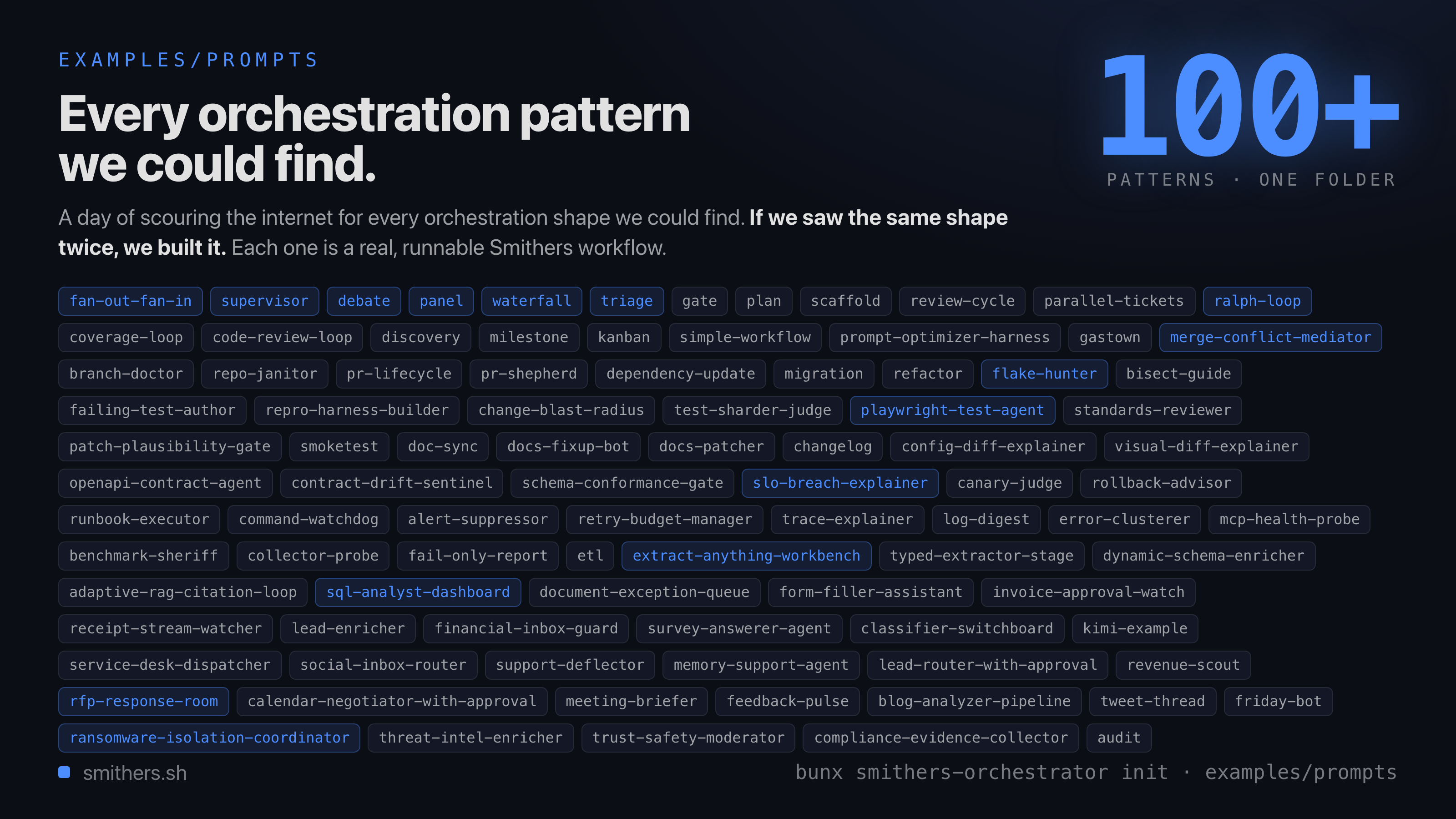
Review loops, parallel ticket fleets, supervisors, panels, debates, migrations, RAG citation loops, repo janitors, and dozens more, each a runnable starting point.
Also in the box
Smithers is built for agents that modify real repositories, so control is wired into the runtime:
- Approvals: gate risky steps behind a human approve or deny before they run.
- Isolation: sandbox agents so edits never touch your host.
- Observability: Prometheus metrics and OpenTelemetry traces out of the box, plus a
one-command local Grafana stack (
bunx smithers-orchestrator observability). - Evals and prompt optimization: repeatable regression suites, and GEPA-style tuning that rewrites prompts only when the score improves.
- Hot reload: edit prompts, config, or JSX mid-run; newly scheduled tasks pick up the changes.
Read next
- Tour: build a real code-review workflow in six steps.
- Install the agent skill: make your coding agent fluent in Smithers.
- How It Works: the durable execution model.
- Components: the full primitive set.
- Awesome Smithers: community projects, workflow packs, examples, and integrations.
Docs
Full documentation lives at smithers.sh.
License
MIT
Comments (0)
Sign in to join the discussion.
No comments yet
Be the first to share your take.