
A personal wiki builder that ingests articles, papers, and repositories, then uses Claude to summarize, extract concepts, and answer questions across your accumulated knowledge. Designed for researchers and learners who want an AI-assisted system to organize sources and surface connections without manual curation.
LLM-powered personal knowledge base — raw articles → compiled wiki → Q&A + outputs. Claude writes, you curate.
65Stars
29Forks
0Open issues
1Watching
HTML MIT Updated 2 months ago
README
LLM Knowledge Base System
A personal, AI-powered knowledge base — built on Andrej Karpathy's workflow. Created by Acy Doan.


Core idea: The LLM reads, summarizes, and connects knowledge for you. You just feed it sources, ask questions, and get back reports.
What does this system do?
| You do | The system does |
|---|---|
| Clip an article from the web | Summarizes it, extracts concepts |
fetch-url: a JS-heavy page |
Fetches full content + images, ready to compile |
| Fetch a GitHub repo | Pulls README + metadata + file tree |
| Add a PDF paper | Analyzes it, connects it to existing knowledge |
| Ask a question | Answers based on the entire wiki |
| Request a report | Generates report/slides from multiple sources |
Once the wiki reaches ~50+ articles, the system starts surfacing connections you hadn't noticed across things you've already read.
Getting Started
1. Clone the repo
git clone https://github.com/hoadoan1997/llm-knowledge-base.git
cd llm-knowledge-base
2. Open in your AI coding tool
Open this folder in Claude Code, Cursor, or Windsurf. The AI will auto-read CLAUDE.md → AGENTS.md and understand the full workflow.
Then just start chatting:
scan /raw
3. (Optional) Install dependencies for PDF/Office conversion and charts
The core workflow (scan → compile → query) requires no dependencies — just Bash and Python 3 (standard library).
If you want to convert PDF/DOCX/PPTX files or generate charts, install the optional packages:
python3 -m venv tools/.venv
source tools/.venv/bin/activate
pip install -r requirements.txt
4. (Optional) Open as an Obsidian vault
For the best reading experience with graph view, backlinks, and Dataview queries:
- Install Obsidian
- "Open folder as vault" → select this directory
- Install the Obsidian Web Clipper browser extension → set save location to
raw/articles/
Workflow
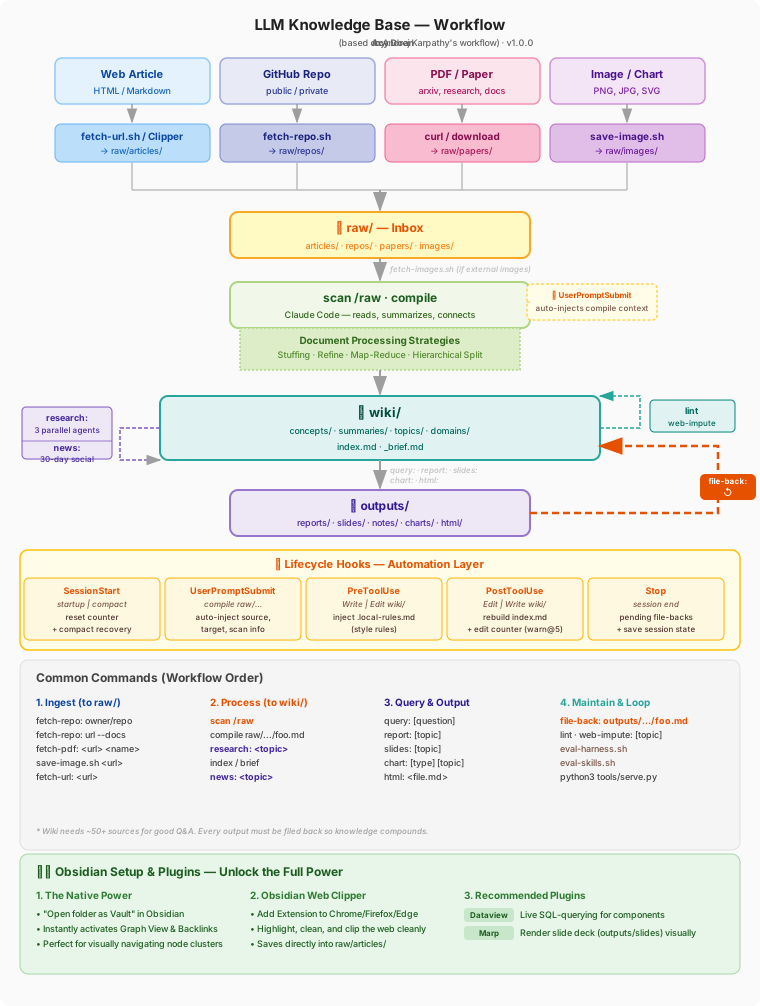
Directory Structure
/
├── .claude/
│   └── settings.json       ← Hooks config (5 hooks: compile context, index rebuild, edit counter, session state, file-back)
│
├── plans/                  ← Implementation plans (upgrade tracking)
│
├── raw/                    ← This is the "inbox" — drop sources here
│   ├── archived/           ← Original files (.pdf, .docx, etc.) after conversion
│   ├── articles/           ← Web articles (.md from Web Clipper)
│   ├── repos/              ← GitHub repos (.md from fetch-repo.sh)
│   ├── papers/             ← Academic papers (.pdf)
│   └── images/             ← Images downloaded to local
│
├── wiki/                   ← Organized knowledge
│   ├── index.md            ← Master index
│   ├── _brief.md           ← 1-page summary of the entire wiki (read before querying)
│   ├── concepts/           ← Atomic ideas, one concept per file
│   ├── summaries/          ← Per-document summaries from /raw
│   ├── topics/             ← Deep-dives on specific subjects
│   └── domains/            ← Maps of Content by knowledge domain
│
├── outputs/                ← Generated outputs
│   ├── reports/            ← Long-form reports
│   ├── slides/             ← Slideshows (Marp format)
│   ├── notes/              ← Quick notes
│   ├── charts/             ← PNG charts
│   └── html/               ← Self-contained HTML pages (md2html skill)
│
├── skills/                 ← Portable AI skills (resolver pattern)
│   ├── compile-ingest/     ← scan/compile skill
│   ├── last30days/         ← news: social research pipeline
│   ├── md2html/            ← html: Markdown → self-contained HTML
│   ├── research-pipeline.md
│   ├── output-generation.md
│   ├── query-mode.md
│   └── lint-impute.md
│
└── tools/                  ← Workflow support scripts
    ├── build-index.py      ← Rebuilds index.md + _brief.md (backlink ranking, overview)
    ├── finalize-compile.sh ← Post-compile: lint → mark → index → append insight
    ├── metrics.py          ← Token counting + cost estimation per compile
    ├── convert-docs.py     ← Core script: converts PDF/DOCX/PPTX to MD
    ├── convert.sh          ← Wrapper: auto-converts all binary files in raw/
    ├── fetch-repo.sh       ← Fetches a GitHub repo into raw/repos/
    ├── fetch-url.sh        ← Fetches any webpage → Markdown (auto static/Jina, images, noise filter)
    ├── fetch-url.py        ← Core logic for fetch-url.sh
    ├── file-back.sh        ← Tracks the feedback loop
    ├── impute.sh           ← Creates skeleton concept files for web-impute
    ├── scan.sh             ← Tracks ingest status + compile metrics
    ├── fetch-images.sh     ← Downloads external images from clipped articles (markdown + HTML)
    ├── save-image.sh       ← Downloads a single specific image
    ├── search.sh           ← Full-text search + fuzzy search across the wiki
    ├── lint.sh             ← Wiki health check (10 checks + duplicate detection)
    ├── eval-harness.sh     ← System-level eval: context budget, hooks, wiki health (run before/after upgrades)
    ├── eval-skills.sh      ← Skill quality eval: frontmatter, gotchas, resolver paths
    ├── chart.py            ← Generates PNG charts
    └── serve.py            ← Search UI in the browser
.lint-ignore-terms(root) — allow-list for lint checks: add terms that don't need a concept file (people's names, phrases, headings).
Step 1: Put content into raw/
Each source type has its own tool:
Web articles — fetch-url (recommended for data-rich pages)
For product announcements, benchmark pages, documentation with tabs, or any page that uses JavaScript to render content:
./tools/fetch-url.sh https://www.anthropic.com/news/claude-opus-4-7
./tools/fetch-url.sh https://example.com/article my-custom-name
./tools/fetch-url.sh https://example.com/article --force-jina   # force JS rendering
./tools/fetch-url.sh https://example.com/article --dry-run      # preview
Or via Claude Code command:
fetch-url: https://www.anthropic.com/news/claude-opus-4-7
The script automatically: fetches the page (static or JS-rendered via r.jina.ai), strips navigation/footer noise, downloads and filters images (keeps charts ≥80KB, drops logos/decorative), then saves to raw/articles/<slug>.md — ready for compile.
Web articles — Obsidian Web Clipper (simple static articles)
- Install the "Obsidian Web Clipper" extension on Chrome/Firefox
- Set the save location to:
raw/articles/ - Clip an article → a
.mdfile automatically appears inraw/articles/
When to use which: Obsidian Web Clipper is fine for plain text articles (blogs, essays). Use
fetch-url:when the page has tables, charts, tabs, or heavy JavaScript — the clipper will silently miss that content.
GitHub repos — fetch-repo.sh
Obsidian Web Clipper cannot clip GitHub (JS-heavy). Use the script instead:
./tools/fetch-repo.sh karpathy/nanoGPT
./tools/fetch-repo.sh https://github.com/anthropics/anthropic-sdk-python
./tools/fetch-repo.sh huggingface/transformers --docs    # also fetch the docs/ folder
./tools/fetch-repo.sh owner/repo --dry-run               # preview without fetching
→ Creates raw/repos/owner-repo.md with: metadata, README, file tree, and optionally docs/
Or use the Claude Code command:
fetch-repo: karpathy/nanoGPT
fetch-repo: https://github.com/anthropics/anthropic-sdk-python --docs
PDFs / Word / Excel / PPTX — Auto Convert
The AI works best with plain text (.md). Office files and PDFs need to be converted to Markdown before the AI can compile them.
# Download a PDF
curl -L "https://arxiv.org/pdf/1706.03762" -o raw/papers/attention-is-all-you-need.pdf

# Auto-convert all binary files in the raw/ directory
./tools/convert.sh
After conversion, the original files (PDF/DOCX/...) are automatically moved into raw/archived/ to keep things clean.
Or use the Claude Code command:
fetch-pdf: https://arxiv.org/pdf/1706.03762 attention-is-all-you-need
Images / diagrams — save-image.sh
./tools/save-image.sh <url> [name] [--source "article name"]
Step 2: Compile into the wiki
Open Claude Code in this directory and run:
scan /raw
Claude will automatically:
- Check which files are new and haven't been compiled yet
- Download any external images to local (if present)
- Read and summarize each file
- Create/update
wiki/summaries/,wiki/concepts/,wiki/domains/ - Verify output quality (required sections, valid links, concept limits)
- Run lint → update indexes → mark as processed
To compile a specific file:
compile raw/articles/article-name.md
compile raw/repos/karpathy-nanoGPT.md
Step 3: Ask questions and generate outputs
Q&A from the wiki
query: explain [concept]
query: compare [A] and [B]
query: summarize everything about [topic]
query: find connections between [domain A] and [domain B]
The wiki needs ~50+ articles before Q&A gives consistently good results. Early on, there will still be many gaps.
Deep research → wiki
research: [topic] → parallel sub-agents research the topic, compile into wiki
Uses 3 parallel agents (web search, wiki analysis, expert sources) then compiles findings into summaries + concepts with a mandatory quality checklist.
News & trends (last 30 days) → wiki
news: [topic] → wiki/summaries/news-topic-YYYY-MM-DD.md
Researches a topic across Reddit, YouTube, Hacker News, and Polymarket for the last 30 days. Surfaces social sentiment, trending discussions, and prediction market odds — then automatically files results into the wiki. The skill (skills/last30days/) is bundled in the project; the underlying search scripts require the last30days-skill plugin (Claude Code marketplace). Use for news, recent events, social trends; use research: for timeless structured knowledge.
Generate reports / slides / HTML
report: [topic]         → outputs/reports/report-topic-YYYY-MM-DD.md
slides: [topic]         → outputs/slides/slides-topic-YYYY-MM-DD.md  (Marp)
notes: [topic]          → outputs/notes/note-topic-YYYY-MM-DD.md
html: [file.md]         → outputs/html/file.html  (self-contained, shareable)
Use html: after report: to convert a Markdown report into a polished, shareable HTML page with TOC sidebar, Mermaid diagrams, step timelines, light/dark theme, and print-to-PDF support. No install needed — zero dependencies for the recipient.
Generate charts
chart: timeline [topic]
chart: bar [topic]
chart: network [topic]
See all chart types: tools/.venv/bin/python3 tools/chart.py --list-types
Step 4: File Back (REQUIRED)
After every report: or query: that produces a new insight, run:
file-back: outputs/reports/report-name.md
Claude will:
- Re-read the output
- Identify insights that are new compared to the current wiki
- Update
wiki/concepts/orwiki/summaries/accordingly - Mark the output as filed back in the log
This is the compound feedback loop — every output makes the wiki smarter over time.
To see outputs that haven't been filed back yet:
./tools/file-back.sh --list
./tools/file-back.sh --verify outputs/reports/foo.md  # check if the wiki has been updated
./tools/file-back.sh --log      # history
./tools/file-back.sh --stats    # summary stats
Step 5: Maintain the wiki
lint                    # check wiki health (broken links, missing concepts)
index                   # rebuild index.md and _brief.md from scratch
brief                   # update _brief.md only
CLI Tools
fetch-repo.sh — fetch a GitHub repo
./tools/fetch-repo.sh owner/repo               # fetch README + metadata + file tree
./tools/fetch-repo.sh owner/repo --docs        # also fetch the docs/ folder
./tools/fetch-repo.sh https://github.com/owner/repo
./tools/fetch-repo.sh owner/repo --dry-run     # preview without fetching
→ Output: raw/repos/owner-repo.md
→ No auth needed for public repos. Private repos require a GITHUB_TOKEN environment variable.
file-back.sh — track the feedback loop
./tools/file-back.sh --list                               # outputs not yet filed back
./tools/file-back.sh --mark outputs/reports/foo.md        # mark manually
./tools/file-back.sh --mark outputs/reports/foo.md --note "added to concepts/bar.md"
./tools/file-back.sh --log                                # history
./tools/file-back.sh --stats                              # summary stats
scan.sh — track ingest status
./tools/scan.sh --new                          # which files haven't been compiled
./tools/scan.sh --status                       # full table of all files
./tools/scan.sh --info raw/papers/paper.pdf    # check word count, suggested strategy
./tools/scan.sh --mark "raw/articles/foo.md"   # manually mark as compiled
convert.sh — auto-convert binary documents
Converts PDF, DOCX, PPTX, XLSX files to .md format in preparation for compiling. The original files are moved to raw/archived/ afterward.
./tools/convert.sh                           # convert all pending files in raw/
./tools/convert.sh "raw/papers/file.pdf"     # convert a single file
./tools/convert.sh --scan                    # just list files waiting to be converted
./tools/convert.sh --dry-run                 # parse and print to terminal (no files written)
fetch-url.sh — fetch any webpage into the pipeline
Fetches a URL and saves a clean Markdown file to raw/articles/, with images downloaded automatically.
./tools/fetch-url.sh https://example.com/article              # auto-slug from URL
./tools/fetch-url.sh https://example.com/article my-name      # custom output name
./tools/fetch-url.sh https://example.com/article --force-jina # force JS rendering
./tools/fetch-url.sh https://example.com/article --dry-run    # preview
Strategy: tries static extraction first (fast, token-efficient). If word count < 200, falls back to r.jina.ai which renders JavaScript. Auto-runs fetch-images.sh and drops decorative images < 80KB.
→ Output: raw/articles/<slug>.md with local image paths, ready for compile
fetch-images.sh — download external images from clipped articles
When a clipped article has images as external URLs (not local), this script downloads them to raw/images/ and rewrites the links in the file so Claude can read them.
./tools/fetch-images.sh raw/articles/foo.md           # download + rewrite
./tools/fetch-images.sh raw/articles/foo.md --dry-run # preview, don't download
Note: Claude can read and describe local PNG/JPG images, but cannot fetch external URLs. Run this script before
scan /rawif an article has important charts or diagrams.
save-image.sh — download a single image
./tools/save-image.sh <url> [name] [--source "article name"]
search.sh — search the wiki
./tools/search.sh "attention mechanism"        # full-text search
./tools/search.sh "align" --fuzzy              # fuzzy: also finds aligned/aligning/alignment
./tools/search.sh "transformer" --files        # return file paths only
./tools/search.sh --list-all                   # all wiki files
./tools/search.sh --related scaling-laws       # files related to a topic
serve.py — browser-based search UI
python3 tools/serve.py
# → opens http://localhost:7337
lint.sh — check wiki health
./tools/lint.sh                # run and print results
./tools/lint.sh --save         # save report to outputs/notes/
./tools/lint.sh --impute       # list missing concepts that need research
./tools/lint.sh --quick wiki/concepts/foo.md   # fast single-file check
Lint checks 10 sections: broken links, orphan files, missing frontmatter, domain stats, tag clusters (detects potential new domains), stale MOCs, bridge note candidates, and duplicate concept detection (flags concept pairs with ≥60% tag overlap).
Noise reduction: The "missing concepts" check uses smart filtering (ASCII ratio, word count, allow-list). Add terms to
.lint-ignore-terms(root) to exclude them from the check.
impute.sh — create skeleton concept files for web-impute
./tools/impute.sh "mixture of experts"         # creates wiki/concepts/mixture-of-experts.md
./tools/impute.sh "KV Cache" --domain ai       # specify the domain
./tools/impute.sh --list                       # list already-imputed concepts (confidence: low)
Generates a correctly formatted frontmatter, sets confidence: low, adds [needs verification] placeholders, and auto-detects the domain from the name.
The AI just fills in the content — no need to worry about formatting.
chart.py — generate charts
tools/.venv/bin/python3 tools/chart.py --type timeline \
  --data '{"2017":"Transformer","2020":"GPT-3","2022":"ChatGPT"}' \
  --title "LLM Timeline" --out llm-timeline

tools/.venv/bin/python3 tools/chart.py --list-types   # see all chart types
Output is saved to outputs/charts/.
Wiki Structure
wiki/index.md
Master index of all concepts, topics, and summaries. Updated automatically after each compile.
wiki/_brief.md
A one-page summary of the entire wiki — Claude reads this before answering any query. This is the most important file for getting good Q&A results.
wiki/concepts/
Each file is one atomic concept. Examples:
scaling-laws.md— how capability scales with computeai-alignment.md— ensuring AI does what humans intendrlvr.md— Reinforcement Learning from Verifiable Rewards (2025)vibe-coding.md— programming using natural language
wiki/summaries/
Per-document summaries of everything ingested. Links to related concepts and domains.
wiki/domains/
Maps of Content — entry points organized by knowledge domain. Domains don't need to be designed upfront — create one when you naturally have ≥10 concepts in the same area. Run lint to automatically detect potential new domains.
wiki/topics/
Deep-dives on specific subjects, synthesizing multiple concepts.
Scale Expectations
| Stage | Wiki size | Capability |
|---|---|---|
| Early | ~10–30 articles | Basic Q&A, still many gaps |
| Growing | ~50–100 articles | Good Q&A, connections start to emerge |
| Mature | ~100+ articles / ~400K words | Multi-hop reasoning, complex synthesis |
| Advanced | Large | Consider synthetic data + fine-tuning |
Obsidian Setup (optional)
Obsidian is the best viewer for this wiki — it supports graph view, backlinks, and Dataview queries.
- Obsidian → "Open folder as vault" → select this directory (root)
- Plugin status:
| Plugin | Status | How to use |
|---|---|---|
| Obsidian Web Clipper (browser ext) | Install separately on Chrome/Firefox | Clip web pages → auto-saves to raw/articles/ |
| Marp Slides | ✅ Installed | Open a file in outputs/slides/ → Cmd+P → "Marp Slides: Open Preview" |
| Dataview | ✅ Installed | Renders ```dataview``` blocks automatically — see examples at wiki/dataview-examples.md |
| Graph View | ✅ Built-in | Cmd+G — instantly shows the full wiki network |
| Graph Analysis | Not installed | Optional — cluster analysis, centrality |
Dataview — sample queries
```dataview
TABLE source, created FROM "wiki/summaries"
SORT created DESC
```
```dataview
LIST FROM "wiki/concepts"
WHERE contains(tags, "ai-safety")
```
See full examples at wiki/dataview-examples.md.
Marp Slides — export
npm install -g @marp-team/marp-cli          # install once
marp outputs/slides/file-name.md --html      # export to HTML
marp outputs/slides/file-name.md --pdf       # export to PDF
Operating Principles
- The LLM writes the wiki, you curate — don't edit wiki files manually
- Always file back outputs — every report/query makes the wiki smarter
- Don't design domains upfront — create a domain MOC when you naturally have ≥10 notes
- No RAG needed at small scale — at ~400K words, the LLM navigates via the index
- Each source type has its own tool —
fetch-url:(web/JS pages), Web Clipper (simple articles),fetch-repo:(GitHub),fetch-pdf:(PDFs) - file-back is mandatory — this is the loop that makes knowledge compound over time
Configuration Files
| File | Purpose |
|---|---|
CLAUDE.md |
Setup guide and commands for users |
AGENTS.md |
Detailed instructions for Claude when executing (don't edit unless you want to change behavior) |
.claude/settings.json |
Claude Code hooks — 5 hooks: auto-rebuild index, compile context injection, wiki edit counter, session state persistence (compact recovery), file-back reminder |
workflow.svg |
Workflow diagram — embedded in README |
Comments (0)
Sign in to join the discussion.
No comments yet
Be the first to share your take.