
LiveAgent is a desktop application that connects large language models to local system tools, enabling AI agents to read files, execute commands, and manage tasks. It supports multiple AI models, integrates external tools via MCP protocol, and includes an optional remote gateway for browser-based control.
A fully functional AI Agent desktop client that supports Webui access and can be creatively customized and expanded!
1,040Stars
95Forks
9Open issues
3Watching
TypeScript MIT v1.1.4 Updated 1 day ago
README
🌟 Special Thanks
❤️ Sponsor
🤝 Come Build With Us!
Why LiveAgent?
LiveAgent is a local-first AI agent desktop client. It deeply integrates large language model reasoning with local system tools, so the AI can genuinely operate your file system, run commands, and manage scheduled tasks — while the Gateway enables remote access and collaboration.
- An agent that actually gets things done — beyond chat: read and write files, make precise edits, run Bash, and supervise long-running processes
- A fully open ecosystem — bridge any external tool via the MCP protocol, and load Skills packages on demand
- Local and remote, both — the desktop app works fully standalone; deploy the Gateway and control it from any browser
Core Features
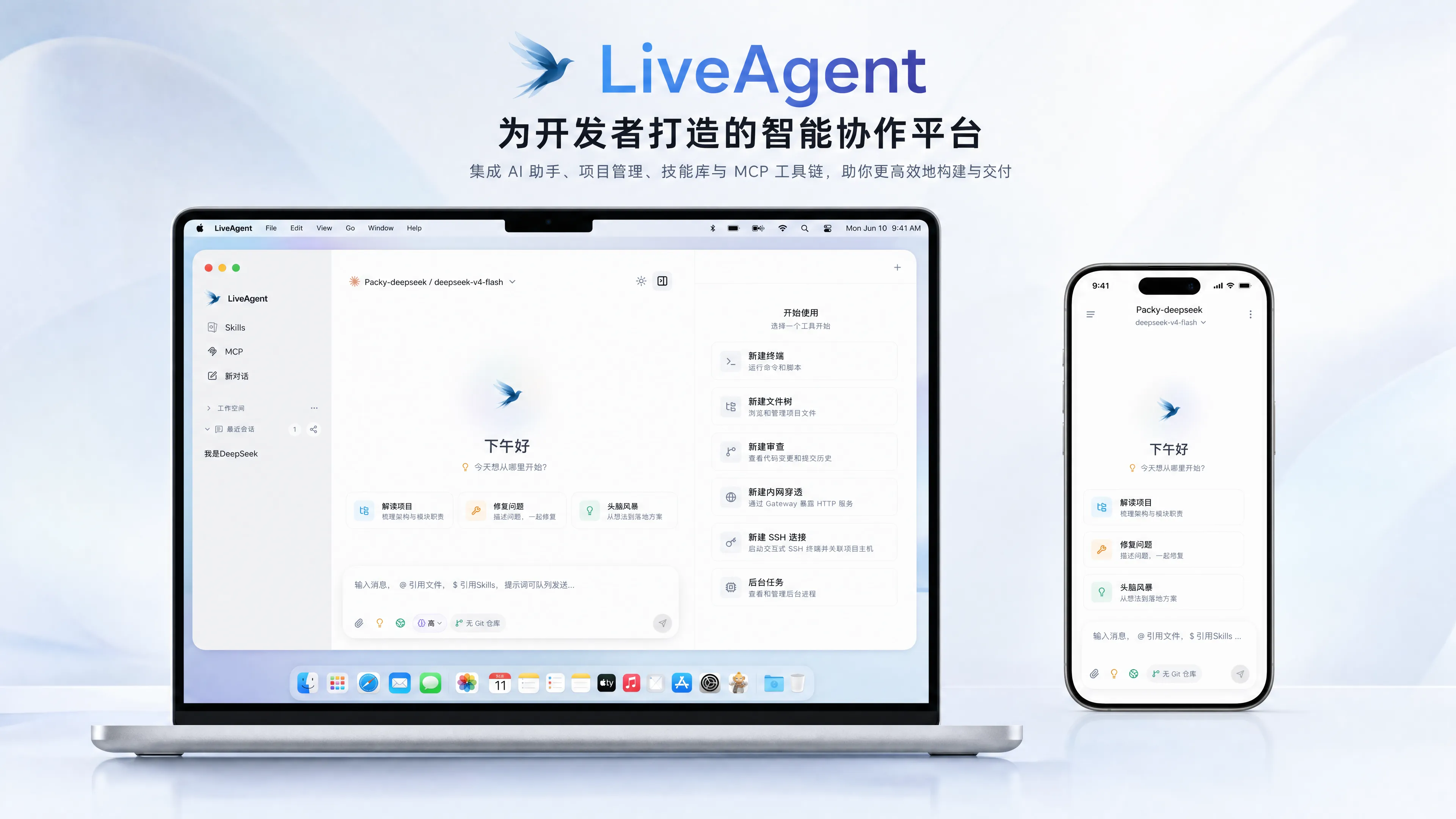
🧠 Multi-Model & Chat
- Multi-model routing — Claude (Anthropic), Codex (OpenAI), and Gemini protocols, with custom Base URL support for third-party compatible services
- Rich rendering — streaming Markdown with built-in KaTeX math, Mermaid diagrams, and Monaco code preview
- History compaction — dual-layer Segment + Summary Checkpoint persistence keeps long conversations from losing context
- Internationalization — built-in i18n multi-language framework
🔧 Local Tool Execution
- Full file-system capabilities — precise
Read/Write/Edit/Delete, plusGlob/Greppattern and regex search - Bash & long-running processes — non-interactive command execution (cwd / timeout), with
ManagedProcesssupervising dev servers and other resident tasks - Sub-agent delegation — independent sub-agents execute in parallel with worktree isolation and automatic merging
- Tunnel exposure —
TunnelManagerexposes local services to the public internet in one click
🧩 MCP & Skills Ecosystem
- MCP protocol bridging — the Tauri side natively bridges any stdio / http MCP server for unlimited tool extension
- Skills packages — progressive disclosure and on-demand loading, with install / create / package support and the ClawHub ecosystem
💾 Memory & Automation
- Persistent memory — Markdown + SQLite FTS full-text search for cross-session knowledge management
- Scheduled tasks — bash / http / prompt cron job types, executed automatically in the background
🌐 Remote Gateway
- Access from any browser — Go gateway (WebSocket + Protobuf) with a WebUI for remotely controlling the local agent
- Disconnect recovery — a bounded seq window replays short outages, with desktop-side persistence as the safety net
Download & Deployment
Installers are automatically built, signed, and published by GitHub Actions — grab the latest version from GitHub Releases.
System Requirements
| Platform | Requirements |
|---|---|
| macOS | Both Intel (x64) and Apple Silicon (aarch64) architectures |
| Windows | x64; requires the WebView2 runtime (bundled with Windows 11) |
| Linux | x86_64; requires WebKitGTK 4.1 (Ubuntu 22.04+ / Debian 12+, etc.) |
macOS
Download the DMG matching your chip from Releases, open it, and drag LiveAgent into Applications:
- Apple Silicon (M-series):
LiveAgent-<version>-macOS-aarch64.dmg - Intel:
LiveAgent-<version>-macOS-x64.dmg
The installer is signed and notarized by Apple — no manual security override is needed on first launch.
Windows
Pick an installation method from Releases:
| Method | File | Best for |
|---|---|---|
| Setup wizard | LiveAgent-<version>-Windows-x64-Setup.exe |
Most users |
| MSI package | LiveAgent-<version>-Windows-x64.msi |
Enterprise distribution / silent install |
| Portable | LiveAgent-<version>-Windows-x64-portable.zip |
No install — unzip and run |
Linux
Choose by distribution from Releases:
| Format | Distributions | Install |
|---|---|---|
| AppImage | Any distribution | chmod +x, then run directly |
| DEB | Debian / Ubuntu family | sudo dpkg -i LiveAgent-<version>-Linux-x86_64.deb |
| RPM | Fedora / openSUSE family | sudo rpm -i LiveAgent-<version>-Linux-x86_64.rpm |
Need Remote Access? Deploy the Gateway
The desktop app works out of the box and depends on no server. Deploy the Gateway only if you want to control your local agent from a browser.
Note: when deployed behind an Nginx reverse proxy, set the Gateway address on the Settings → Remote page to the HTTPS URL and use port 443.
# Pull the image (built by GitHub Actions, multi-arch: amd64 / arm64)
docker pull ghcr.io/stack-cairn/liveagent-gateway:latest

# Run in the background (HTTP/WebSocket → host 3000)
docker run -d \
  --name liveagent-gateway \
  --restart unless-stopped \
  -p 3000:8080 \
  -e LIVEAGENT_GATEWAY_TOKEN=your-token \
  ghcr.io/stack-cairn/liveagent-gateway:latest
One-command upgrade to the latest version — pull the new image → remove the old container → recreate it with the same arguments (if you changed the port mappings or token, adjust the arguments below accordingly):
docker pull ghcr.io/stack-cairn/liveagent-gateway:latest \
  && docker rm -f liveagent-gateway \
  && docker run -d \
    --name liveagent-gateway \
    --restart unless-stopped \
    -p 3000:8080 \
    -e LIVEAGENT_GATEWAY_TOKEN=your-token \
    ghcr.io/stack-cairn/liveagent-gateway:latest \
  && docker image prune -f
Since protocol v2, all traffic — the WebUI, the HTTP API, and the WebSocket links of both the browser and the desktop app — goes through the single HTTP port (default 3000).
WebSocket upgrades happen on several paths (
/ws/v2,/ws/v2/agent,/ws/v2/terminal, and tunnels under/t/), so the simplest correct setup enables the upgrade on the whole vhost:
# WebUI SPA/static/API + every WebSocket link (browser and desktop)
location / {
    proxy_pass http://127.0.0.1:3000;
    proxy_http_version 1.1;

    # WebSocket upgrade
    proxy_set_header Upgrade $http_upgrade;
    proxy_set_header Connection "upgrade";

    # Required: the Gateway's same-origin check compares the browser's
    # Origin header against X-Forwarded-Proto + Host
    proxy_set_header Host $host;
    proxy_set_header Authorization $http_authorization;
    proxy_set_header X-Forwarded-For $proxy_add_x_forwarded_for;
    proxy_set_header X-Forwarded-Proto $scheme;

    # The Gateway pings every WebSocket connection every 15s,
    # so a generous-but-finite timeout is enough
    proxy_read_timeout 300s;
    proxy_send_timeout 300s;
    proxy_buffering off;
}
The upstream port maps to the host port from the
docker runabove: HTTP/WebSocket 3000 (inside the container, HTTP actually listens onPORT=8080). The server block needslisten 443 ssl;and aclient_max_body_sizelarge enough for attachment uploads (e.g.100m).
Build from Source
Expand the Development Guide below for the full set of Make commands.
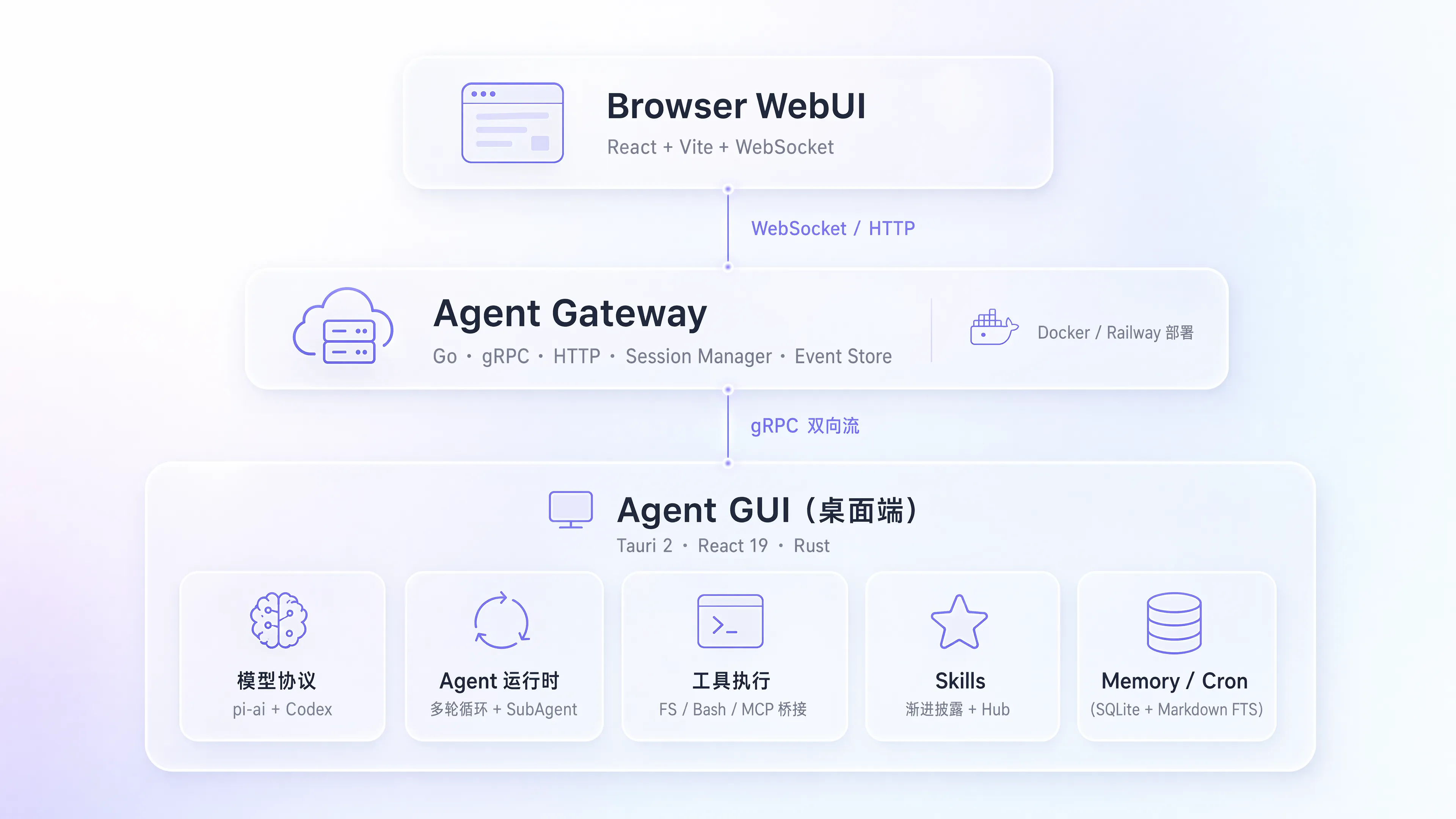
┌──────────────────────────────────────────────────────────────┐
│                        Browser WebUI                          │
│              React + Vite + WebSocket + Gateway API           │
└────────────────────────────┬─────────────────────────────────┘
                             │ WebSocket / HTTP
┌────────────────────────────▼─────────────────────────────────┐
│                       Agent Gateway                           │
│    Go · WebSocket · HTTP · Session Manager · Event Store     │
│               (Railway / Docker / self-hosted)                │
└────────────────────────────┬─────────────────────────────────┘
                             │ WebSocket v2 (bidirectional stream)
┌────────────────────────────▼─────────────────────────────────┐
│                        Agent GUI                              │
│                   Tauri 2 · React 19 · Rust                  │
├──────────┬────────────┬───────────┬────────────┬─────────────┤
│ Models   │ Runtime    │ Tools     │ Skills     │ Memory/Cron │
│ pi-ai    │ multi-turn │ FS/Bash/  │ progressive│ SQLite+MD   │
│ + Codex  │ + SubAgent │ MCP bridge│ + Hub      │ FTS index   │
└──────────┴────────────┴───────────┴────────────┴─────────────┘
Tech Stack
| Component | Technology |
|---|---|
| Agent GUI · Framework | Tauri 2 + React 19 + TypeScript 6 |
| Agent GUI · Build | Vite 8 + pnpm |
| Agent GUI · Styling | Tailwind CSS 4 + Radix UI |
| Agent GUI · Rendering | streamdown + KaTeX + Mermaid + Monaco Editor |
| Agent GUI · Backend | Rust + Tokio + SQLite (rusqlite) + WebSocket (tokio-tungstenite) |
| Agent GUI · LLM | @earendil-works/pi-ai · @openai/codex-sdk · claude-agent-sdk |
| Gateway · Language | Go 1.25 |
| Gateway · Protocols | WebSocket + Protobuf + HTTP |
| Gateway · Web UI | React + Vite + Tailwind CSS (embedded) |
| Gateway · Deployment | Docker multi-stage · Railway CI/CD |
| Command | Description |
|---|---|
make dev |
Start the Tauri development environment |
make build |
Build the desktop app |
make dev-gateway |
Start the Gateway dev server |
make dev-webui |
Start the WebUI dev server |
make gateway-build |
Build the Gateway binary |
make gateway-docker-build |
Build the Docker image |
make gateway-docker-smoke |
Build + health check |
make desktop-build-macos-release |
macOS signed release build |
make build-linux |
Linux amd64 gateway |
make build-linux-arm |
Linux arm64 gateway |
make proto |
Regenerate Protobuf code |
make clean |
Clean build artifacts |
LiveAgent/
├── crates/
│   ├── agent-gui/                # Desktop client
│   │   ├── src/                  # React frontend
│   │   │   ├── components/       #   UI components
│   │   │   ├── lib/              #   Core logic (chat, tools, skills, memory)
│   │   │   ├── pages/            #   Pages (Chat, Settings)
│   │   │   ├── i18n/             #   Internationalization
│   │   │   └── prompt/           #   System prompt templates
│   │   └── src-tauri/            # Rust backend (Tauri)
│   │
│   └── agent-gateway/            # Go gateway service
│       ├── cmd/gateway/          #   Entry point
│       ├── internal/             #   Core implementation
│       ├── proto/v1/             #   Protobuf definitions
│       └── web/                  #   Embedded WebUI
│
├── docs/                         # Project docs
│   ├── architecture/             #   Architecture design
│   ├── features/                 #   Feature guides
│   └── operations/               #   Operations & deployment
│
├── scripts/release/              # Release automation
├── .github/workflows/            # CI/CD (CI + Desktop Release + Gateway Docker)
├── Dockerfile                    # Gateway container image
├── Makefile                      # Build commands
└── Cargo.toml                    # Rust workspace
FAQ
No. Keys are stored locally on the desktop side only. The Gateway is a pure protocol relay — it never accesses the file system and never stores any credentials.
No. The desktop client works standalone with all local capabilities; deploy the Gateway only when you need browser-based remote access to your local agent.
Claude (Anthropic), Codex (OpenAI), and Gemini protocols are built in, plus custom Base URL support for any compatible third-party service.
No. The desktop app persists the full history with Segment + Summary Checkpoints; the Gateway replays short disconnects through a bounded seq window and converges automatically after reconnecting.
Contributing
Issues and pull requests are welcome! See the Development Guide for setting up a dev environment.
Before submitting a PR, make sure all of the following checks pass (they match the CI gates):
Desktop client · crates/agent-gui
- Type check & build pass:
pnpm build - Lint passes:
pnpm lint - Frontend unit tests pass:
pnpm test:frontend(also runpnpm test:releasewhen touching release scripts) - Rust backend check passes:
cargo check --manifest-path crates/agent-gui/src-tauri/Cargo.toml --tests(run from the repo root)
Gateway · crates/agent-gateway (if changed)
- Go unit tests pass:
go test ./... - WebUI build / lint / tests pass:
pnpm build && pnpm lint && pnpm test(run inweb/) - Regenerate and commit artifacts after proto changes:
make proto
Cross-frontend consistency
- Mirrored files between GUI and WebUI must be byte-identical:
node scripts/check-mirror.mjs - Keep the diff clean (no trailing whitespace):
git diff --check
👥 Contributors
Thanks to everyone who has contributed to LiveAgent!
Star History
License
MIT © StackCairn
Comments (0)
Sign in to join the discussion.
No comments yet
Be the first to share your take.