
An all-in-one local search engine that runs AI models, indexes files and code, crawls the web, and provides cited answers—accessible via TUI, CLI, REST API, MCP server, or Python library. It performs RAG entirely on your machine without requiring separate model servers, vector databases, or cloud services.
A local AI search engine: it runs and manages local AI models, searches your files and code, and crawls the web, all in one program. Cited answers, local-first, with an MCP server for your coding agent. TUI, CLI, REST API, and Python library. Works or without Ollama and LM Studio.
38Stars
4Forks
9Open issues
1Watching
Python MIT v0.6.90b420.dev718 Updated 1 week ago
README
lilbee runs and manages your models: chat, embedding, vision, and rerank, placed across every GPU you have. It puts them to work as a search engine you can talk to, over your files, notes, code, and the web, where every answer cites the exact file and line. It crawls websites into your library, launches your coding agents on local models, and hands any MCP-aware agent cited answers from everything you've indexed. The same engine backs the Obsidian community plugin, so your vault gets all of it without a terminal. Ask in plain English. No containers, no networking, nothing else to install or set up.

It's all one program: no separate model server, vector database, or container to stand up. lilbee runs the models and keeps the index itself. Reach it as a terminal app, CLI, Model Context Protocol server, HTTP API, or Python library. Close it and it's gone, or run it as a service to keep it warm. Everything runs on your computer; it uses a cloud model only when you pick one.
Models are no different: lilbee has its own model manager and multi-GPU fleet, built on llama.cpp, so one executable does everything (browse Hugging Face, download a model, give it a role, run it on Metal / Vulkan / CUDA). You don't need Ollama or LM Studio at all: the model families lilbee runs are the architectures behind most of the 190,000+ GGUF repos on Hugging Face, verified per family on real GPUs. If you already use them, point lilbee at your existing setup and keep your models.
Tutorial reel: every demo on this page (and the extras) as a real video player at lilbee.sh/tutorial.
⚠️ Beta software
lilbee is in active beta development. Every release on PyPI is a pre-release; you must use
--pre(or uv's--prerelease=allow) when installing. Interfaces, command names, and on-disk formats may shift between betas. Feedback, bug reports, and issues are very welcome; that's the whole point of the beta.Latest pre-release (always): lilbee on PyPI →
- Quick start
- Tutorial reel (long-form videos)
- Highlights
- Why lilbee
- What you can do with it
- TUI
- Hardware requirements
- Install
- First start
- Agent integration
- HTTP Server · REST API reference
- Supported formats
- Experimental
- Built on
Quick start
Two recommended ways to use lilbee, depending on whether you're the one driving:
- Run
lilbeefor the full-screen terminal app. A welcome wizard picks a chat and embedding model, then you index files, search, and chat without leaving the TUI. The Settings screen exposes every retrieval knob (search depth, distance threshold, reranker, chunking) so you can tune lilbee to your library shape. - Connect it to your agent over MCP. Any MCP-aware coding agent calls
lilbee_search/lilbee_addand gets back cited snippets it can quote. Agents can also fine-tune lilbee on the fly vialilbee_settings_set. Drop in the lilbee-mcp skill and the agent reads the full surface: every tool, every retrieval knob, and when to widen for prose vs narrow for code. See Agent integration.
Defaults are sane for chatting with code, documentation, crawled sites, and long PDFs. Every retrieval setting is writable from the TUI Settings screen, the /set slash command, MCP lilbee_settings_set, or config.toml. When answers feel thin or noisy, the usual knobs are top_k, max_distance, or diversity_max_per_source.
CLI, the HTTP API, env vars, and config.toml are there for scripting, headless runs, and custom integrations. See the usage guide.
Highlights
- Answers cite the source line. Click a citation, jump to the file at the exact line. When the answer isn't in your library, lilbee says so instead of inventing one.
- It works, and the demos prove it. Every GIF and tutorial reel here is recorded live on real hardware, nothing staged. Backed by 100% test coverage, full typing, and CI on macOS, Linux, and Windows.
- Up and running in one command. Install, run
lilbee, and a first-run wizard pulls a model and drops you straight into chat. - Reads almost anything you point it at. Documents, scanned pages, spreadsheets, ebooks, web pages, and source code: 90+ formats and 150+ languages in all. Whatever you give it becomes searchable.
- Splits it into pieces that stand on their own. Prose and code are chunked differently, so each piece keeps its meaning instead of getting cut mid-thought. A search engine is only as good as the chunks underneath it, and this is where most of the quality lives.
- A sophisticated search engine on top, built on published research. It ranks every result by how well it answers you, so the best match comes back first. 50+ knobs to tune from the Settings screen or hand to your agent, with sane defaults if you'd rather not.
- It brings and runs the models itself. Browse Hugging Face, pull a model, give it a role (chat, embedding, vision, reranking); lilbee runs it on Metal, Vulkan, or CUDA. You never point it at a server you set up.
- A model too big for one card runs across all of them. lilbee sizes each role with gguf-parser and tensor-splits your chat model across the fewest GPUs that fit, placing the embedder, reranker, and vision models alongside it behind a load-balancing router. It happens automatically, or you can pin each role to the cards you choose. Run a model bigger than one card.
- Already on Ollama or LM Studio? Keep them. You don't need either one: lilbee's own manager handles everything, across the same model families they run. But lilbee also works with both, so you never have to switch. Their models show up in the same catalog and role pickers, alongside lilbee's own.
- Your hardware, put to work. Your machine can do a lot more than you're using it for. lilbee runs local models on hardware you already own, no cloud account required.
- Per-project libraries. Keep one library for everything, or give each project its own.
- One install, many surfaces. TUI, CLI, MCP server, REST API, and Python library. Nothing to stand up.
- Everything in one file, nothing to operate. The standalone binary bundles the whole thing (search engine, web crawler, MCP server, HTTP server, terminal UI, Python, and llama.cpp) in ~290-420 MB, or ~0.6-1.2 GB with CUDA. No Docker, no vector database, no model server, nothing to keep running; it loads on demand. Comparable desktop AI apps (often Electron) ship hundreds of MB to several GB and do less.
- Works with your coding agent. Connect lilbee to your AI coding assistant and it answers from your actual files and code, with citations, instead of guessing. It can even adjust its own search as it works.
Why lilbee
A small local model is fun, but limited on its own. Give it properly processed documents and a search engine over them, and it becomes genuinely powerful. Without those, it never gets past novelty.
lilbee does all of it in one install: it runs the models, processes your documents, crawls the web pages you point it at, and searches the lot with a real engine. The same engine works two ways:
- An Encarta 99 over your own files. Build a library from your documents and saved web pages, then read it and ask questions of it in the terminal.
- A reference layer for code. Point it at your project, dependencies, and API docs, and your coding agent answers from what's actually there, with file:line citations, instead of guessing function names.
The long-term goal: make local AI genuinely useful on hardware you already own, with no token budgets and no provider to depend on; the cloud's there only when you want it.
How lilbee compares
lilbee is built for consumer hardware and for people who don't want to babysit infrastructure. It isn't another model server you point an app at; it's a local search engine with the model runner built in. One install gives you the whole stack in a single executable:
- A search engine over your files, with answers that cite the source line, not just a model to chat with.
- A managed fleet, chat, embedding, vision, and reranking, spread across every GPU in the machine behind a load-balancing router, not one model loaded at a time.
- Everything bundled: model manager, search engine, web crawler, MCP server for coding agents (native opencode and hermes), HTTP server, TUI, and Python, in one file.
It sits between two worlds: the desktop runners that get a model chatting on your machine (Ollama, LM Studio), and vLLM, the server you stand up to push one model to a cluster of users. lilbee runs models to do retrieval over your files, and scales that whole stack across every GPU in the machine, from one small file.
Full comparison table
| lilbee | LM Studio | Ollama | vLLM | |
|---|---|---|---|---|
| Primary focus | local search, chat, and serving across your GPUs | desktop app to run and chat with models | local model runner with a growing ecosystem | high-throughput GPU serving |
| Runs local models | ✓ | ✓ | ✓ | ✓ |
| Search your own files, with citations | ✓ full RAG pipeline, inline per-line citations | per-session doc attachment (RAG, document-level citation) | — | — |
| Chat, embedding, vision, rerank as one managed fleet | ✓ all four, coordinated | chat, embed, vision (no rerank), loaded individually | chat, embed, vision (no rerank), loaded individually | each supported, but one model per server |
| Multi-GPU model placement | ✓ VRAM-aware tensor-split | ✓ GPU selection + tensor parallelism (CUDA) | ✓ auto multi-GPU offload | ✓ tensor + pipeline parallel |
| Scales the whole stack, not just one model | ✓ per-GPU replicas + load-balancing router | — | — | one model per server |
| Built for many-user throughput at scale | ✓ a data-parallel replica per GPU, requests load-balanced | — | limited | ✓ this is its job |
| Web crawler built in | ✓ built in | — | — | — |
| Long-term memory (opt-in) | ✓ opt-in | — | — | — |
| Interfaces | TUI, CLI, MCP, REST, Python, Obsidian GUI | desktop GUI, lms CLI, Python + TS SDKs, REST API, MCP client | desktop GUI, CLI, REST API, Python/JS libs | API server |
| Use your existing Ollama / LM Studio / cloud as a backend | ✓ how | — | — | — |
Of the four, lilbee is the only one built around retrieval, and the only one that scales the whole stack, chat, embedding, vision, and reranking, across every GPU in the machine behind a load-balancing router.
Install size (single-file download, models excluded)
Download sizes in decimal GB/MB (bytes ÷ 1000), measured from each project's own release artifacts, linked.
| macOS | Windows | Linux | What you get | |
|---|---|---|---|---|
| lilbee (Metal / Vulkan, default) | 286 MB | 303 MB | 422 MB | the whole stack: search engine, crawler, servers, TUI, model runner, fleet manager |
| lilbee (CUDA, opt-in for NVIDIA) | n/a | 633 MB | 1.20 GB | the same whole stack, with the faster CUDA runtime |
| Ollama | 164 MB | 1.43 GB (CUDA bundled) | 1.44 GB (CUDA bundled) | a model runner, fetches its runtimes separately |
| LM Studio | 569 MB | 617 MB | 1.10 GB | a desktop app (Electron) |
| vLLM | n/a | n/a | multi-GB | a Python + CUDA serving engine |
Even lilbee's CUDA build stays under Ollama's, and it's the whole stack, not just a model runner.
Already on Ollama or LM Studio? lilbee runs on top of them. Prefer a GUI to the terminal? The Obsidian plugin maps lilbee's model manager and search to a visual interface inside your vault.
What you can do with it
A library of your own files
Point lilbee at a folder of PDFs, notes, ebooks, or code and it builds a searchable library, with citations that click back to the source line. The pattern works for anything you have a lot of text about: a shelf of appliance manuals, a field's research papers, a car's service manuals, your company's internal wiki. Whatever you give it becomes searchable, and you can talk to it.

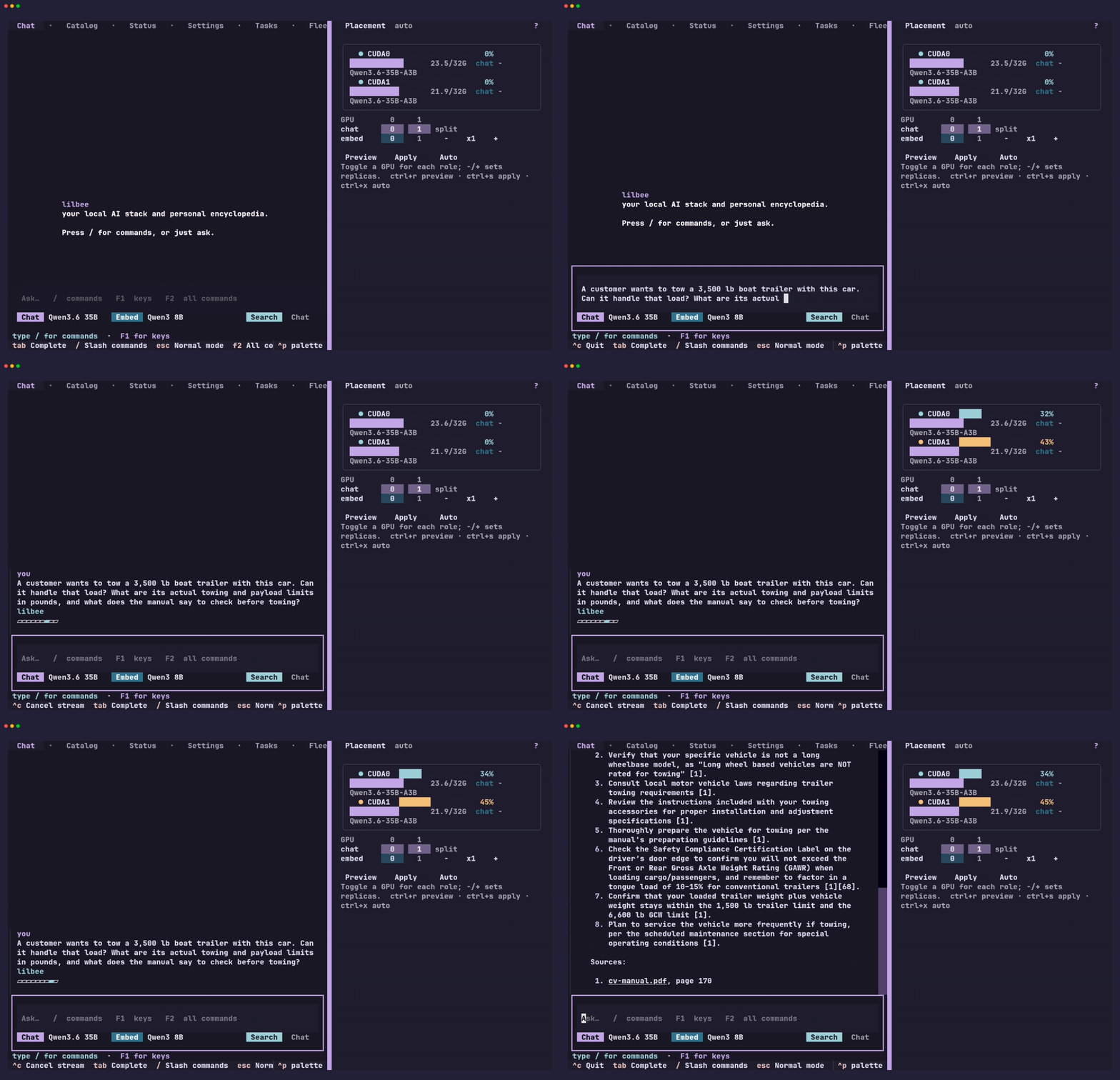
Ask it something with a real answer at stake and you get the answer, not a paraphrase of the question. Here the trailer is too heavy for the car: lilbee says so, gives the weight it is rated for, and cites the page it read that on. The panel on the right is the GPU doing it, on this machine.
Already using an MCP-aware agent? Hand setup to it.
If you've already got an MCP-aware coding agent running, it can do the setup: browse the catalog, pull picks, assign them to the embedding / reranker / vision roles, and tune retrieval. No TUI, no config file, no restart. Agents already understand search engines, so the right knobs are obvious to them. See the lilbee-mcp skill for the workflow and example prompts.
Launch your coding agent on local models
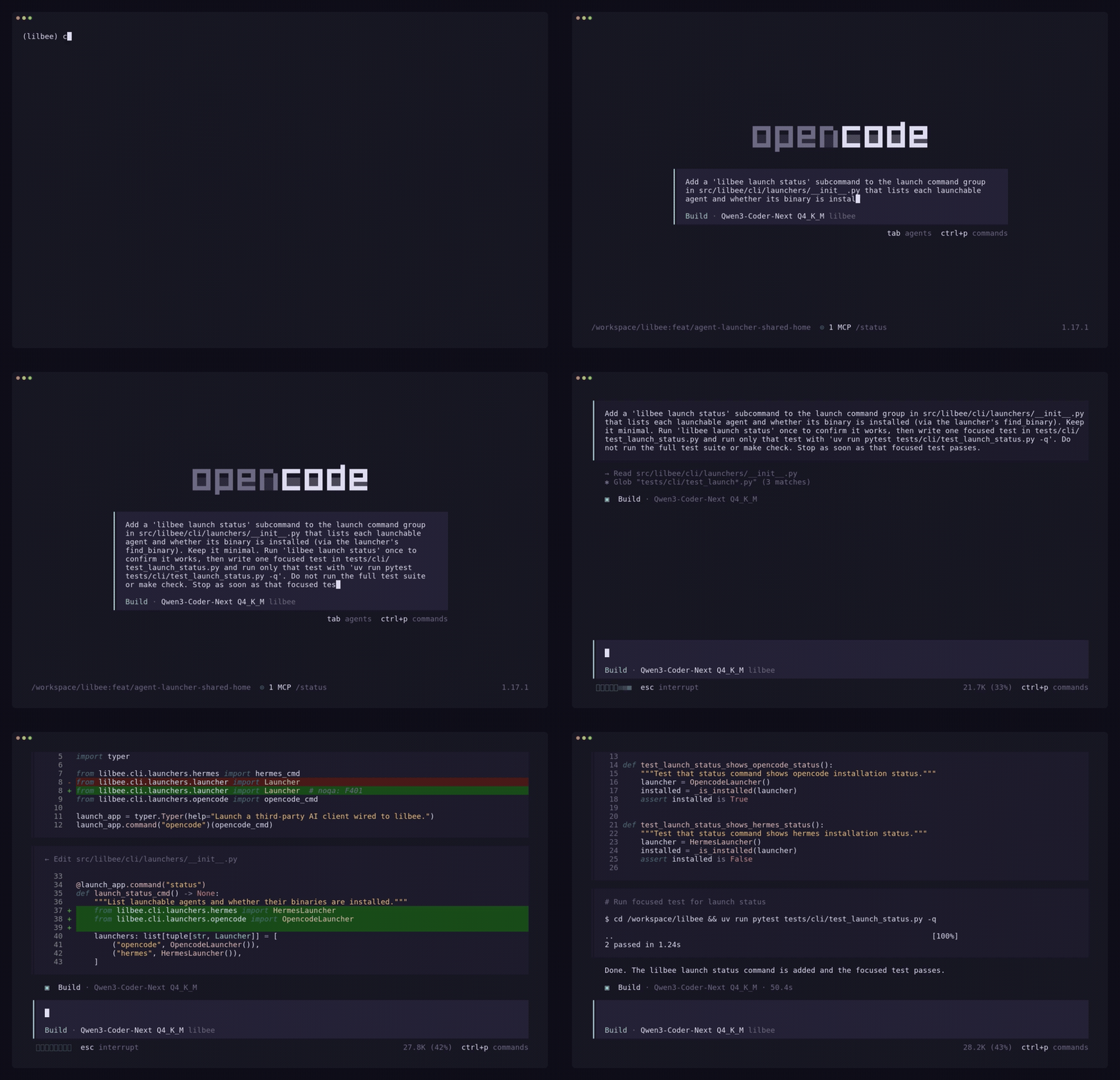
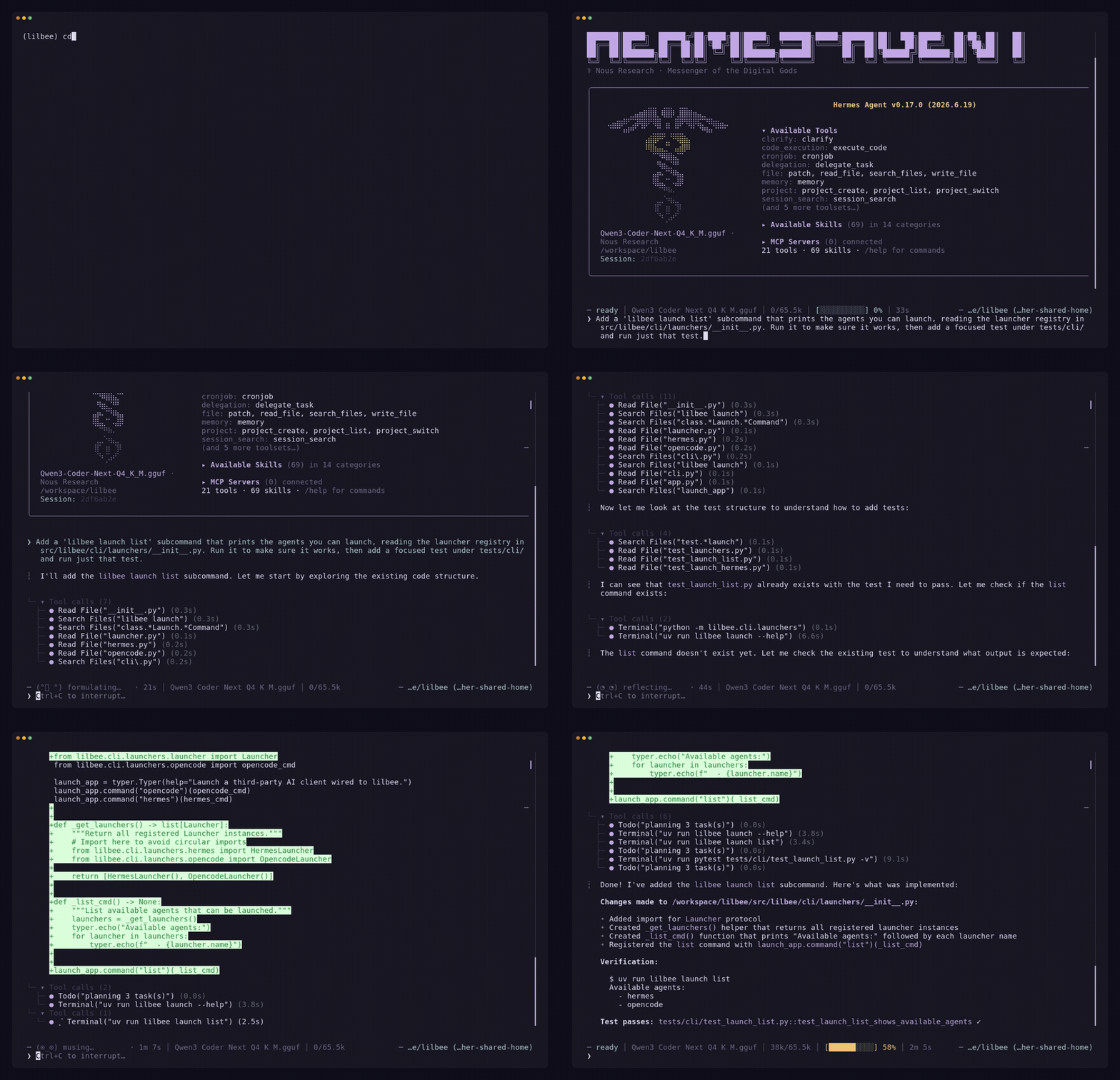
lilbee launch opencode and lilbee launch hermes set up lilbee's local models in your agent in one command. lilbee registers itself as a provider and an MCP server in the agent's own config, leaves your existing setup intact, warms a model, and opens the agent pointed at it. No API keys, no provider setup, and nothing leaves your machine. Tool-calling works across many GGUF families; docs/agent-models.md has the verified list and how the QA harness measures it.
These reels show each agent, launched on a local model, doing real work on lilbee's own source. opencode adds a lilbee launch status subcommand, runs it, and writes a test that passes; hermes does the same with lilbee launch list.
It tunes itself, too. Give a small local model a thin first result and tell it to widen lilbee's search, and the second pass returns full function bodies with file:line citations. A more capable model would do the same from a higher-level prompt like "improve your search results." Read the lilbee-mcp skill to teach your own model the pattern.
In this demo a small local model is told: when its first search comes back thin, widen lilbee's search settings and search again. The second pass returns the full function bodies with file:line citations. A more capable model would do the same from a higher-level prompt like "improve your search results." Read the lilbee-mcp skill to teach your own model the pattern.

A reference for AI agents
Once configured, lilbee plugs into whatever agent you use, over MCP. Feed it your project's docs, your dependency source, your API docs, your design notes; the agent stops making up function names and instead reads the actual code, cites file and line, and says it doesn't know when the answer isn't in your library.
Your files, the search index, and the embeddings stay on your computer. The agent calls lilbee_search and gets back cited snippets. The demo below is lilbee talking to lilbee: an agent indexes lilbee's own source, then answers questions about how lilbee works with file:line citations.

Offline copies of websites
Install the [crawler] extra, point lilbee at a docs site, a wiki, or a vendor's API reference, and the pages get fetched, converted to markdown, and added to your library. From then on you can search or chat with that copy of the site offline, even after it changes or goes down.

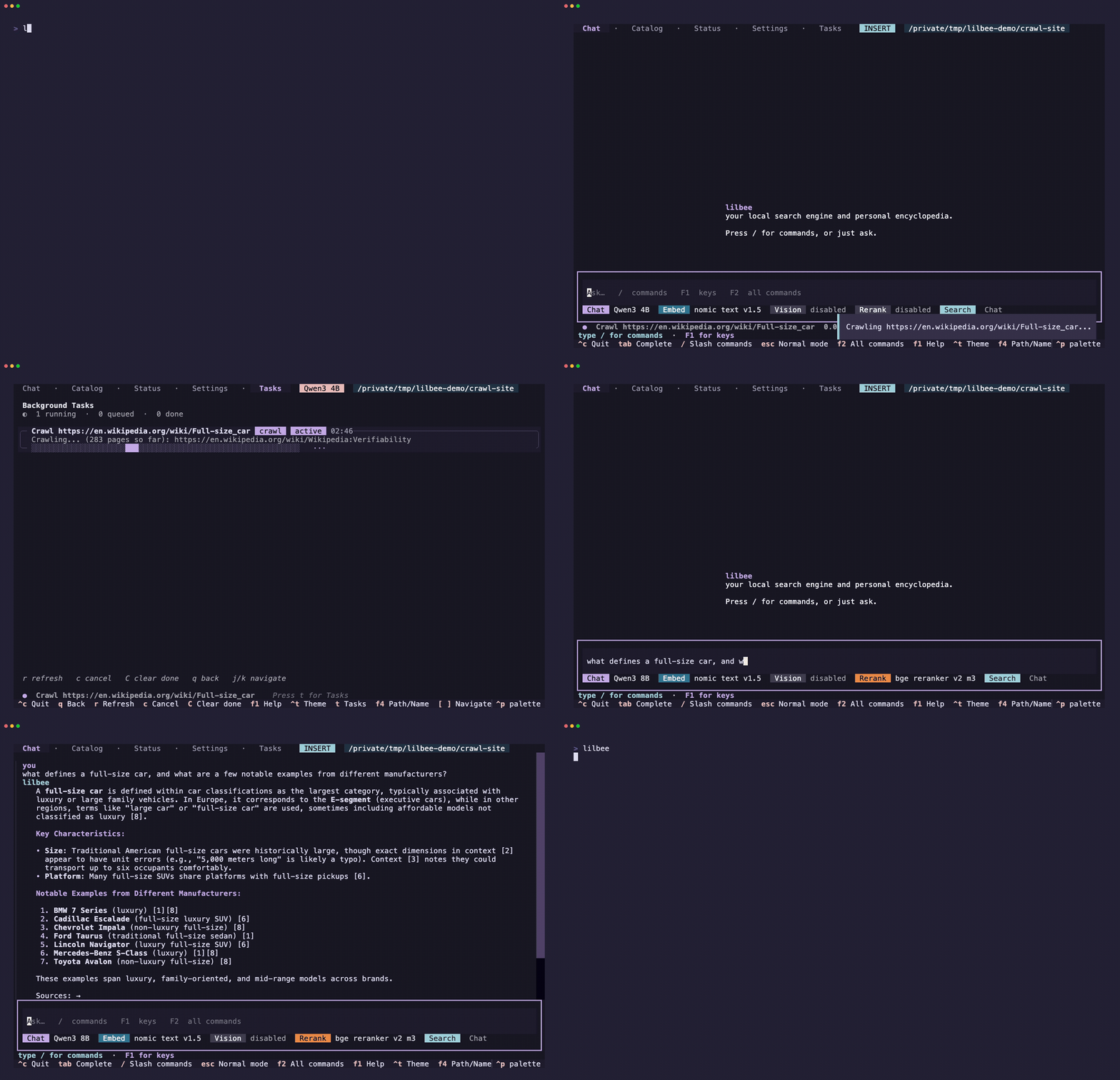
Or crawl a whole site, not just one page. With recursive crawling on, lilbee follows the links and indexes the lot; watch the page count climb in the Task Center, then ask one question that synthesizes across the whole site.
Documents, code, and scanned images
lilbee splits indexing by what's being read:
- Prose and structured documents (PDFs, Office files, ebooks, HTML, 90+ formats) go through [Kreuzberg] with heading-aware chunking, so each chunk keeps its section context.
- Code goes through [tree-sitter]'s AST-aware splitter across 150+ languages, so chunks map to functions, classes, and modules instead of arbitrary line ranges.
- Scanned PDFs and photos go through OCR: Tesseract for plain text, or a local / remote vision model that keeps tables and layout as markdown.
Retrieval returns things that make sense on their own, not fragments cut through an argument or a function signature.
Pick and tune your models
Chat, embedding, vision, and reranking models are installed and switched from inside the terminal: browse the catalog, pull a model, pick a role. Retrieval and generation expose 50+ settings (chunk size, search strictness, reranker depth, and more), editable from the TUI, env vars, or a project-local config file. Sane defaults.
Tested model families
One representative per architecture family, pulled with lilbee model pull and run through the full pipeline (index, search, answer; OCR for vision) on consumer hardware. docs/tested-models.md has the details and method. Between them, these families are the architectures behind most of the 190,000+ GGUF model repos on Hugging Face: if a model's family is listed, its variants and quants are expected to work.
Vision (all on a single 12 GB card, projector fetched by the pull itself):
| Family | Projector type |
|---|---|
| LightOnOCR | lightonocr |
| Qwen2.5-VL | qwen2.5vl merger |
| Qwen3-VL | qwen3vl |
| Gemma 3 | gemma3 |
| SmolVLM2 | idefics3 |
| MiniCPM-V | resampler |
| InternVL3 | internvl |
| LLaVA 1.6 | mlp |
| Gemma 4 | mixed vision+audio |
| dots.ocr | dots.ocr |
Chat (one per memory-architecture class):
| Class | Representative |
|---|---|
| Dense GQA | Llama 3.2 |
| Dense | Qwen3 |
| Sliding-window attention | Gemma 3 |
| Multi-head latent attention | DeepSeek V2 Lite |
| Mixture of experts | OLMoE |
| Hybrid SSM | LFM2 |
Embedding:
| Class | Representative |
|---|---|
| BERT encoder | all-MiniLM-L6-v2 |
| nomic-bert | nomic-embed-text v1.5 |
| Decoder-pooled | Qwen3-Embedding 0.6B |
| Decoder-pooled, large | Qwen3-Embedding 8B |
| XLM-RoBERTa | bge-m3 |
Rerank:
| Class | Representative |
|---|---|
| Cross-encoder | bge-reranker-v2-m3 |
| LLM reranker | Qwen3-Reranker 0.6B |

Already running Ollama or LM Studio? Keep them.
Watch it: Ollama as the model manager and LM Studio as the model manager. Point lilbee at a running manager, index a PDF on camera, and get a cited answer back.
lilbee works with Ollama and LM Studio. Finding and running models for you is the default and simplest path (lilbee pulls them and runs them on Metal / Vulkan / CUDA, no server to stand up), but you don't have to adopt a new model manager to use lilbee.
- Point it at a running manager. Your models in Ollama or LM Studio show up in the same catalog and role pickers (chat, embedding, vision, rerank), labeled by where they run, alongside lilbee's own and any cloud models. Mix freely.
- They stay read-only. lilbee lists and runs them but never pulls or deletes them, so their lifecycle stays in the app you already use.
- On
pip/uv, this needs the[litellm]extra (pip install --pre 'lilbee[litellm]'); the Homebrew, AUR, Nix, Docker, Flatpak, and Snap builds already include it. See Install.
See when a model won't load before you download it
Hugging Face has thousands of GGUFs, but the bundled llama.cpp only supports a subset of architectures and brand-new ones take time to reach the pinned runtime. lilbee tags incompatible models in the catalog and refuses the download (with an override confirm), so you don't wait through a multi-GB pull only to hit "unsupported architecture" at load.

Cloud models, when you want them
lilbee runs entirely on your machine by default. Two ways to use a cloud model when you want one:
- Bring your own key. Install the
[litellm]extra, add an API key, then point any role (chat, embedding, vision, rerank) at a cloud model from the same catalog. The TUI shows a warning the whole time a cloud model is on. - Pair lilbee with a cloud agent over MCP. Your files, the embeddings, and the index stay local. Any MCP-aware agent calls
lilbee_search/lilbee_addand gets back cited snippets.
Either way, your files and the index stay on your computer. Only what you ask and the snippets needed to answer it get sent to the cloud model.
Run a model bigger than one card
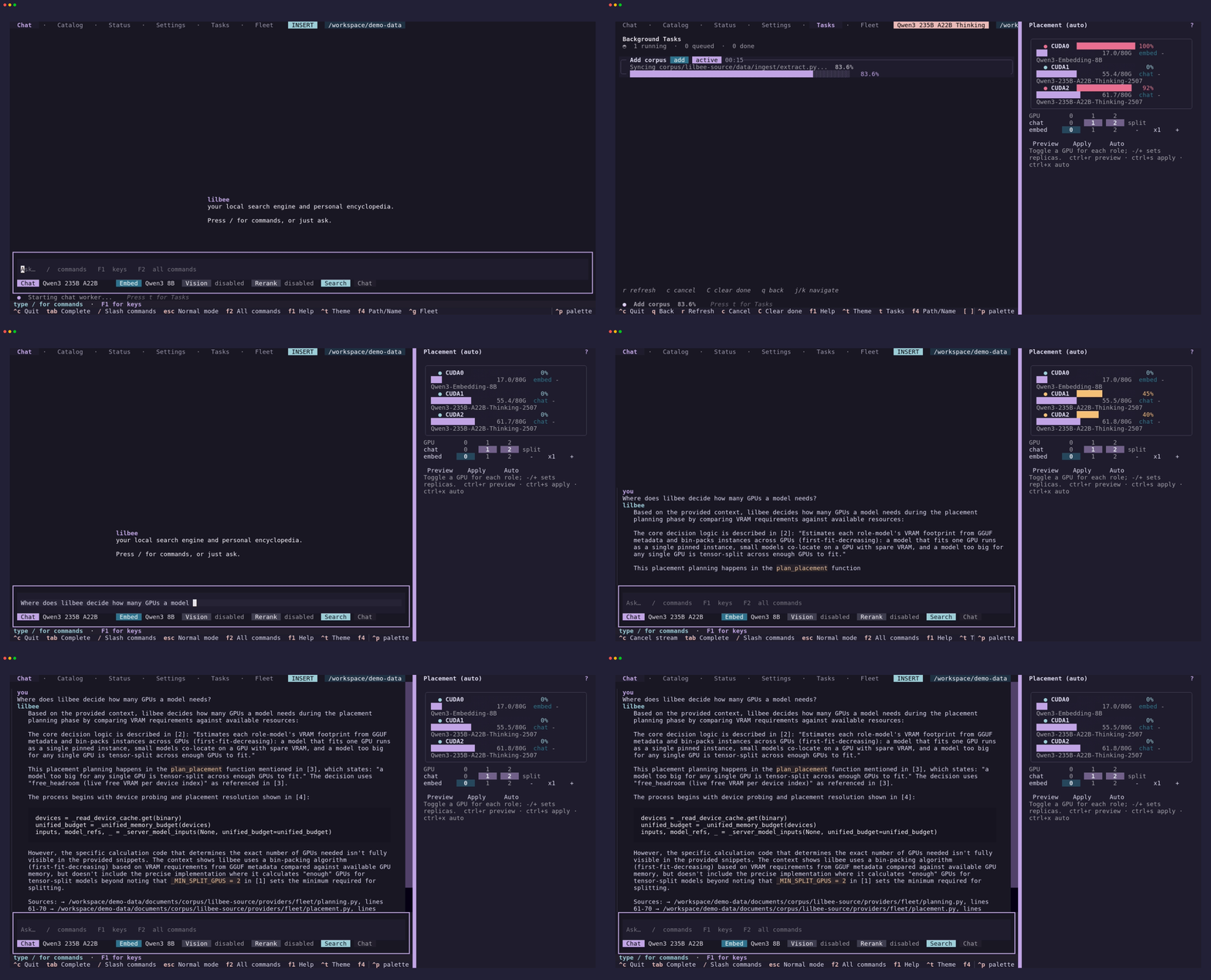
When a chat model won't fit on a single GPU, lilbee spreads it across the ones you have. It sizes each role's memory with gguf-parser, keeps headroom on every card, and tensor-splits the chat model across the fewest GPUs that fit, with the embedder, reranker, and vision models placed alongside it behind a load-balancing router. This is automatic: ask a question and the model loads split across your cards, answering from your own indexed source.
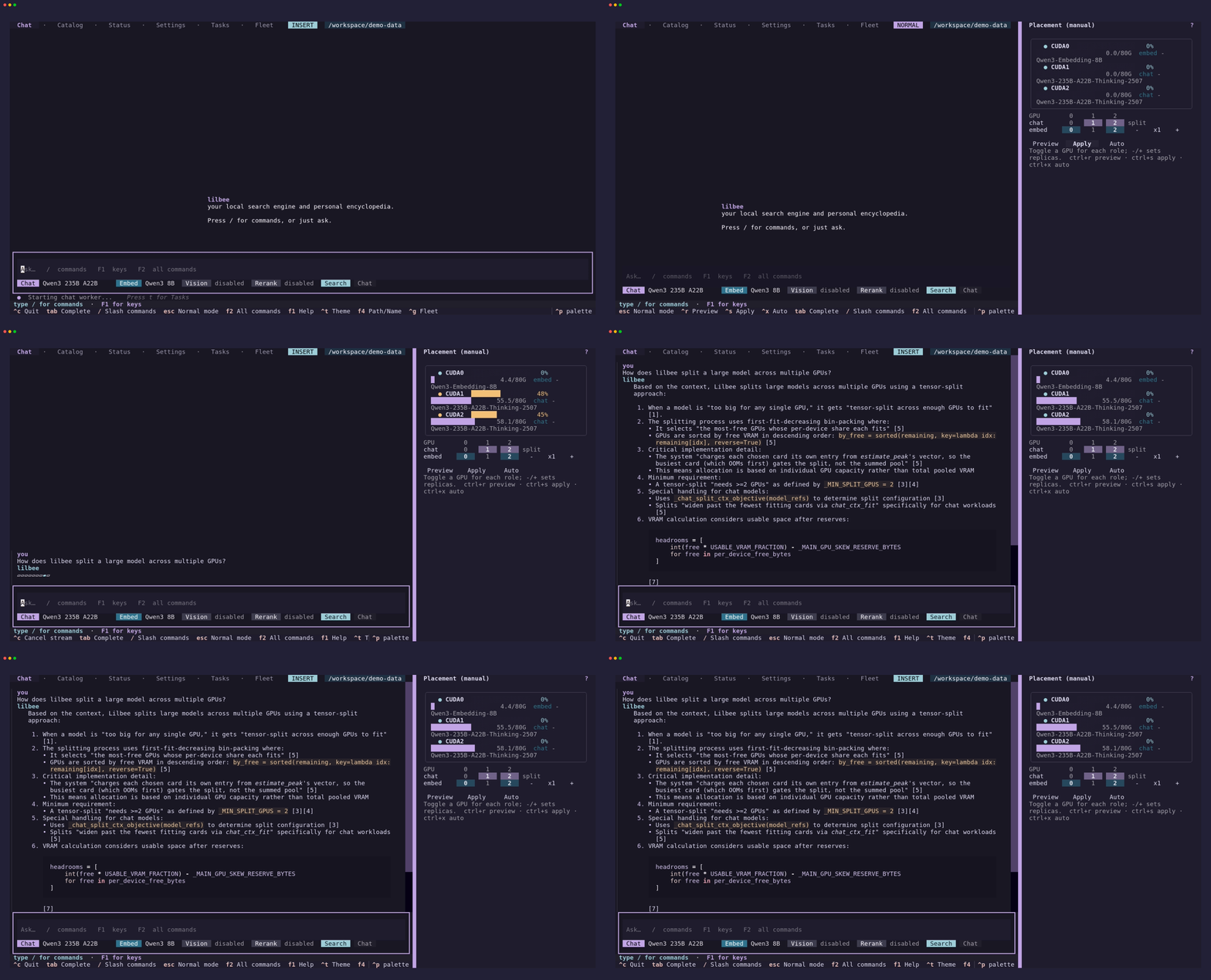
You can also place it by hand. The placement editor pins each role to the cards you choose, previews the fit before anything loads, and applies it live. Ask for a layout that can't fit and it tells you the exact shortfall instead of failing at load time.
TUI
lilbee (no args) launches a full Textual terminal app: streaming chat with clickable citations, a model bar with searchable pickers and a Search/Chat toggle, a Task Center for background jobs, and screens for the model catalog, settings, the setup wizard, and the auto-built wiki. Type / for the command list; tab completion works everywhere.

Ctrl+P opens the Textual command palette, ? on an empty prompt (or F1 anywhere) toggles the keybinding cheat sheet, /help opens the slash-command catalog. Every action lilbee can take is reachable from one of those three.

Every GIF on this page (plus the extras that don't fit here) is at lilbee.sh/tutorial as an embedded video with long-form captions. Tape sources are in demos/. For commands and settings, see the usage guide.
Hardware requirements
Standalone mode runs entirely on your machine. No cloud required. Minimum: Apple Silicon Mac, or a 64-bit Intel/AMD CPU from 2013+ (older CPUs: On older CPUs), or an ARMv8 Linux box; 8 GB RAM, 2 GB disk.
| Platform | Minimum | Recommended |
|---|---|---|
| macOS arm64 | Apple Silicon (M1 or newer), macOS 11+ | M-series Pro / Max / Ultra |
| Linux x86_64 | 64-bit Intel/AMD from 2013+ (x86-64-v3) |
Modern Intel/AMD CPU + an NVIDIA, AMD, or Intel Arc GPU |
| Windows x86_64 | 64-bit Intel/AMD from 2013+ (x86-64-v3), Windows 10/11 |
Modern desktop / workstation CPU + GPU |
| Linux ARM64 | ARMv8 NEON-capable (Raspberry Pi 4+, AWS Graviton, Ampere Altra) | Modern ARM server with 16+ GB RAM |
| Resource | Minimum | Recommended |
|---|---|---|
| RAM | 8 GB | 16 to 32 GB to keep several local models warm at once (chat + embed + rerank + vision); actual footprint scales with the sizes and quantizations you pick |
| GPU / Accelerator | none required (CPU-only works) | Apple Silicon (Metal) · NVIDIA / AMD / Intel Arc (Vulkan) · NVIDIA driver (opt-in CUDA wheels, runtime bundled, see Install) |
| Disk | 2 GB | 10+ GB for multiple models |
Install
Two routes, and the difference matters:
- Into your own Python with
piporuv(Python 3.11 to 3.14). Uses the Python and tooling you already have, picks the fastest CPU code path for your machine at runtime, and upgrades like any other package. Recommended if you have Python. - A self-contained bundle: the standalone binary, or the Homebrew / AUR / Nix / Docker / Flatpak / Snap builds that wrap it. Nothing else to install. The trade-off is a single large download (it bundles its own Python runtime,
llama.cpp, and the optional extras) and a small cold-start cost the first time it self-extracts. Recommended if you'd rather not deal with Python.
Have an NVIDIA GPU? Both routes have a CUDA build that's faster than the default Vulkan path. Skip to On NVIDIA hardware.
No external services either way; lilbee downloads and runs models locally. Optional, for scanned-PDF / image OCR: Tesseract (brew install tesseract / apt install tesseract-ocr) or a GGUF vision model.
| How | Command | Notes |
|---|---|---|
| pip | pip install --pre lilbee |
Recommended. The default wheel runs on any x86_64 CPU with AVX2 (2013+; older CPUs: On older CPUs) and uses your GPU via Vulkan / Metal automatically. Intel Mac: add --extra-index-url https://lilbee.sh/cpu/ (browse wheels). |
| uv | uv tool install --prerelease=allow lilbee |
Same wheel as pip; fetches a Python for you if you need one. |
| Homebrew | brew tap tobocop2/lilbee && brew install lilbee |
macOS arm64 / Linux x86_64. Bundled build; clears the macOS quarantine flag for you. |
| AUR | paru -S lilbee |
Arch Linux. Wraps the Linux x86_64 binary; works with yay / pacaur / any helper. |
| Docker | docker run --rm -v lilbee-data:/home/lilbee/data ghcr.io/tobocop2/lilbee:latest --help |
GHCR image, tagged by version and latest. Data lives at /home/lilbee/data. Mount a volume there. |
| Nix | nix run github:tobocop2/lilbee |
NixOS, nix-darwin, or any host with nix. On Linux the flake bundles glibc, libgomp, and vulkan-loader so it runs on bare NixOS. |
| Flatpak | flatpak remote-add --if-not-exists lilbee https://tobocop2.github.io/flatpak-lilbee/lilbee.flatpakrepo && flatpak install lilbee io.github.tobocop2.lilbee |
Linux x86_64, any distro with flatpak. Needs the Flathub remote for the runtime. Run with flatpak run io.github.tobocop2.lilbee (worth an alias); flatpak update picks up new releases. Data lives under |
Comments (0)
Sign in to join the discussion.
No comments yet
Be the first to share your take.