
A desktop application that aggregates and monitors Claude Code and Codex coding agents running locally on your machine. It provides a unified interface to manage sessions, view full transcripts, track telemetry metrics like token usage and context pressure, and monitor rate limits across all active agents.
Pilot coding agents (Claude Code, Codex) and monitor their telemetry from one cockpit.
62Stars
3Forks
4Open issues
TypeScript MIT v0.1.41 Updated 1 day ago
README
Code-by-wire
English | 简体中文



Pilot coding agents (Claude Code, Codex) and monitor their telemetry from one cockpit.
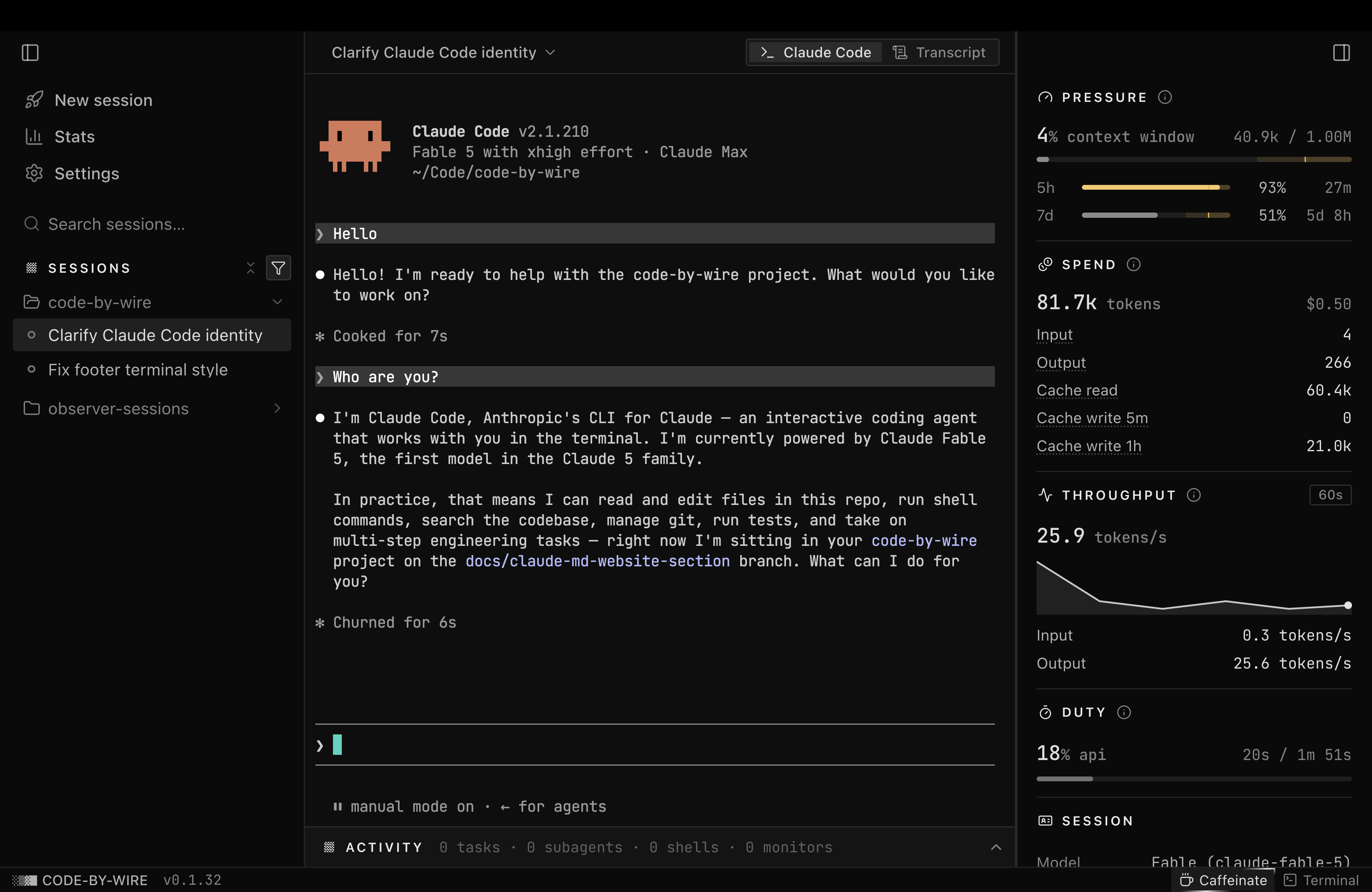
Features
Needs Claude Code and/or Codex installed locally. Open the app and every session already running on your machine is there.
- Every session in one rail. Manage every session running on your machine from one rail: grouped by project, searchable, each flagging its live state.
- Drive, fork, or just watch. Spawn a session in an embedded terminal, fork a live one, resume one you started elsewhere, or observe it read-only.
- The full transcript. Every message, tool call, and result, reconstructed from disk and rendered cleanly.
- The full telemetry. Context pressure, spend, token throughput, duty cycle, git, tasks, subagents, and background shells, live per session.
- The whole story. A cross-session Stats view with a year-long contributions calendar and exact, never-estimated totals.
- Your rate limits in view. Your account's rate-limit windows, read straight from disk, with live reset countdowns.
Download
| Platform | File |
|---|---|
| macOS · Apple Silicon | Code-by-wire-arm64.dmg |
| macOS · Intel | Code-by-wire-x64.dmg |
| Windows · x64 | Code-by-wire-Setup-x64.exe |
| Windows · ARM64 | Code-by-wire-Setup-arm64.exe |
One click starts the download. Always the latest release. You'll need Claude Code and/or Codex installed locally, so there are sessions to observe and control.
On macOS, open the .dmg and drag Code-by-wire to Applications. The app is
signed and notarized by Apple, so it opens straight away. On Windows, run the
.exe; it's unsigned for now, so if SmartScreen warns, click
More info → Run anyway.
Once installed, the app checks for new releases on launch and updates from Settings → About.
Build from source
pnpm install
pnpm rebuild:native   # rebuild better-sqlite3 + node-pty for Electron's ABI
pnpm dist             # macOS: writes the .dmg to release/
pnpm dist:win         # Windows: writes the .exe to release/
A locally built app is unsigned: on macOS the first launch may need a
right-click → Open, or clearing the quarantine flag with
xattr -dr com.apple.quarantine /Applications/Code-by-wire.app; on Windows,
SmartScreen may warn: click More info → Run anyway.
Develop
pnpm install
pnpm rebuild:native   # rebuild better-sqlite3 + node-pty for Electron's ABI
pnpm dev              # launch the app
pnpm test runs the provider read tests over the redacted .claude fixtures
in tests/fixtures/. pnpm typecheck checks the main and renderer projects.
This is a personal project and isn't taking outside code, but bug reports and ideas are welcome. Open an issue, or see CONTRIBUTING.md.
License
Comments (0)
Sign in to join the discussion.
No comments yet
Be the first to share your take.